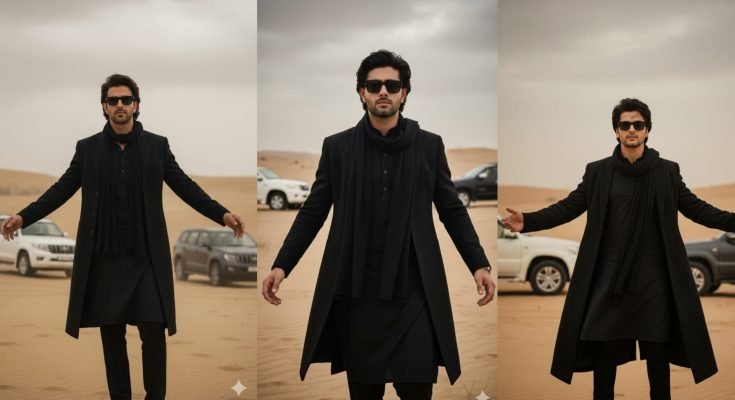
AI image tools have been everywhere for a couple of years now, but Google just pushed things a step further. Gemini’s new image-to-video feature lets you take a single still photo and turn it into a short, moving clip complete with camera motion, natural gestures, and even background sound. It’s the reason your feed is suddenly full of cinematic AI clips, and it’s also why prompts like the “black coat desert” look and the so-called Nano Banana trend have taken over Instagram, TikTok, and YouTube almost overnight.
If you’ve been wondering what this update actually does, how the trending prompts work, and how to get results that don’t look obviously AI-generated, this guide walks through all of it.
What Google Gemini Actually Is
Gemini is Google’s multimodal AI system, which is a fancy way of saying it doesn’t just handle one type of content. It can read and write text, generate images, work with audio, and now animate visuals into short videos all from the same platform. That combination is what sets it apart from single-purpose generators. A designer, a small business owner, or someone who just wants to make a fun clip for friends can all use the same tool without switching between five different apps.
The Big Update: Image-to-Video Generation
The headline feature in Gemini’s latest rollout is straightforward on the surface: upload one photo, describe how you want it to move, and Gemini renders a short animated video from it, typically running up to around eight seconds.
Here’s the basic workflow:
- Upload a photo or AI-generated image.
- Write a prompt describing the motion, mood, and any sound you want.
- Gemini processes the request and generates the animated clip.
- Download it or share it directly to social platforms.
No timeline editing, no keyframing, no video software. That’s the whole appeal: it hands cinematic-looking output to people who’ve never touched a video editor in their life.
What the Feature Can Actually Do
Realistic motion. Gemini can animate things like hair movement, fabric blowing in the wind, walking, subtle facial expression changes, and simulated camera panning or zooming.
Built-in audio. You can request ambient sound, background music, or cinematic effects directly through the text prompt instead of adding audio separately afterward.
Polished visual output. The clips tend to have smooth transitions, deliberate lighting choices, and a level of visual polish that used to require an actual production budget.
Where It Still Falls Short
It’s worth being upfront about the limitations, because plenty of trending posts gloss over them:
- Clips are capped at roughly eight seconds, so it’s not a replacement for full video production.
- Some of the more advanced motion and sound options sit behind a paid tier.
- Availability isn’t uniform everywhere; access can depend on your region.
- Output quality is directly tied to how specific your prompt is. Vague prompts produce vague, generic-looking results.
None of these are dealbreakers, but they explain why the feature is better suited to short social clips than anything longer-form right now.
Why the Black Coat Prompt Went Viral
One image style in particular has been circulating heavily lately: a stylish figure in an all-black outfit, long coat, kurta, scarf, sunglasses, standing in a desert with SUVs parked in the background. It reads like a fashion editorial shot, which is exactly why it spreads so easily. It’s aspirational, it’s moody, and it’s easy for anyone to recreate by swapping in their own face or figure description.
A prompt built around this look typically specifies:
- The exact outfit and color palette (all-black, layered pieces)
- Pose and expression (arms extended, calm, no smile)
- Setting details (desert dunes, overcast sky, parked vehicles)
- Camera specs (85mm lens, shallow depth of field, DSLR-style realism)
- Lighting (soft natural daylight, muted tones)
That level of specificity is the actual secret to why it works so well. It’s not the subject matter alone; it’s the amount of technical and stylistic detail packed into a single prompt.
Other Trending Gemini Prompt Styles Worth Knowing
The black coat look isn’t the only trend circulating. A few others are worth understanding if you’re trying to keep up with what’s actually working right now.
Nano Banana Prompts
This one turns people, pets, or objects into small, glossy, toy-like figures with a banana-inspired shape — think collectible vinyl figure aesthetics rather than realism. It’s playful and works especially well for pet photos or humorous self-portraits.
Cinematic Animation Prompts
These take a portrait and add movement typical of a film scene: someone walking through rain, dramatic side lighting, or a slow-motion effect as fabric or hair moves. The goal is to make a still photo feel like a frame pulled from an actual movie.
“Hug Your Younger Self” Prompts
An emotionally driven trend where users generate an image of themselves embracing a younger version of themselves, usually styled like an old Polaroid photograph. It leans on nostalgia, which tends to perform well for engagement.
Vintage and Retro Aesthetic Prompts
These transform a modern photo into something that looks pulled from a 90s film camera, an old VHS tape, or a yellowed newspaper clipping. Grain, color shift, and slight blur are usually specified directly in the prompt.
Photos With Public Figures
Users generate images that place themselves alongside well-known personalities or historical figures. This category tends to draw the most scrutiny around authenticity, so it’s worth using with some caution and clear labeling if you share it publicly.
How to Write a Prompt That Actually Gets Good Results
Most disappointing AI outputs come down to one thing: the prompt wasn’t specific enough. A few practical habits make a noticeable difference.
Describe motion precisely. Instead of “make it move,” specify what moves: hair, fabric, camera angle, walking pace.
Set the mood explicitly. Words like “calm,” “dramatic,” “nostalgic,” or “energetic” steer the tone in a way generic prompts can’t.
Include camera language. Terms like shallow depth of field, 85mm lens, or slow pan give Gemini a technical reference point, which tends to produce more polished results than purely descriptive language.
Specify sound separately. If you want background music or ambient noise, say so directly; it won’t add sound on its own unless prompted.
Iterate. Small wording changes can shift the output significantly. Treat your first attempt as a draft, not a final version.
A simple example prompt structure looks like this:
“Animate this image into a slow-motion cinematic clip. The subject walks forward with a confident stride while wind gently moves their clothing. Add dramatic side lighting, shallow depth of field, and quiet ambient music in the background.”
Practical Uses Beyond Social Trends
While most of the attention is going toward viral trends, the underlying feature has real utility beyond Instagram Reels:
- Content creators can turn static thumbnails or portraits into short teaser clips without hiring an editor.
- Small businesses can animate product photos into brief promotional clips for ads or stories.
- Marketers can prototype campaign concepts quickly before committing to a full video shoot.
- Portfolio builders, designers, photographers, models can add a motion element to still portfolio work without a video shoot.
What’s Likely Coming Next
Google has been iterating on Gemini quickly, and a few improvements seem like reasonable next steps based on the direction things are heading: longer clip durations, higher resolution output, more nuanced audio generation, and broader regional availability. None of that is confirmed, but it tracks with how the feature has evolved so far.
Final Thoughts
Gemini’s image-to-video feature is lowering the bar for what counts as “video production” in a meaningful way. You don’t need editing software or technical skill; you need a clear idea and a well-written prompt. The black coat desert look, Nano Banana figures, and the nostalgic younger-self trend are popular right now specifically because their prompts are detailed and easy to copy.
If you want to get real value out of the tool rather than just chasing whatever trend is circulating this week, focus on writing prompts with the same level of detail these viral examples use: clear subject, clear motion, clear mood, and clear camera direction. That’s really the whole formula.