
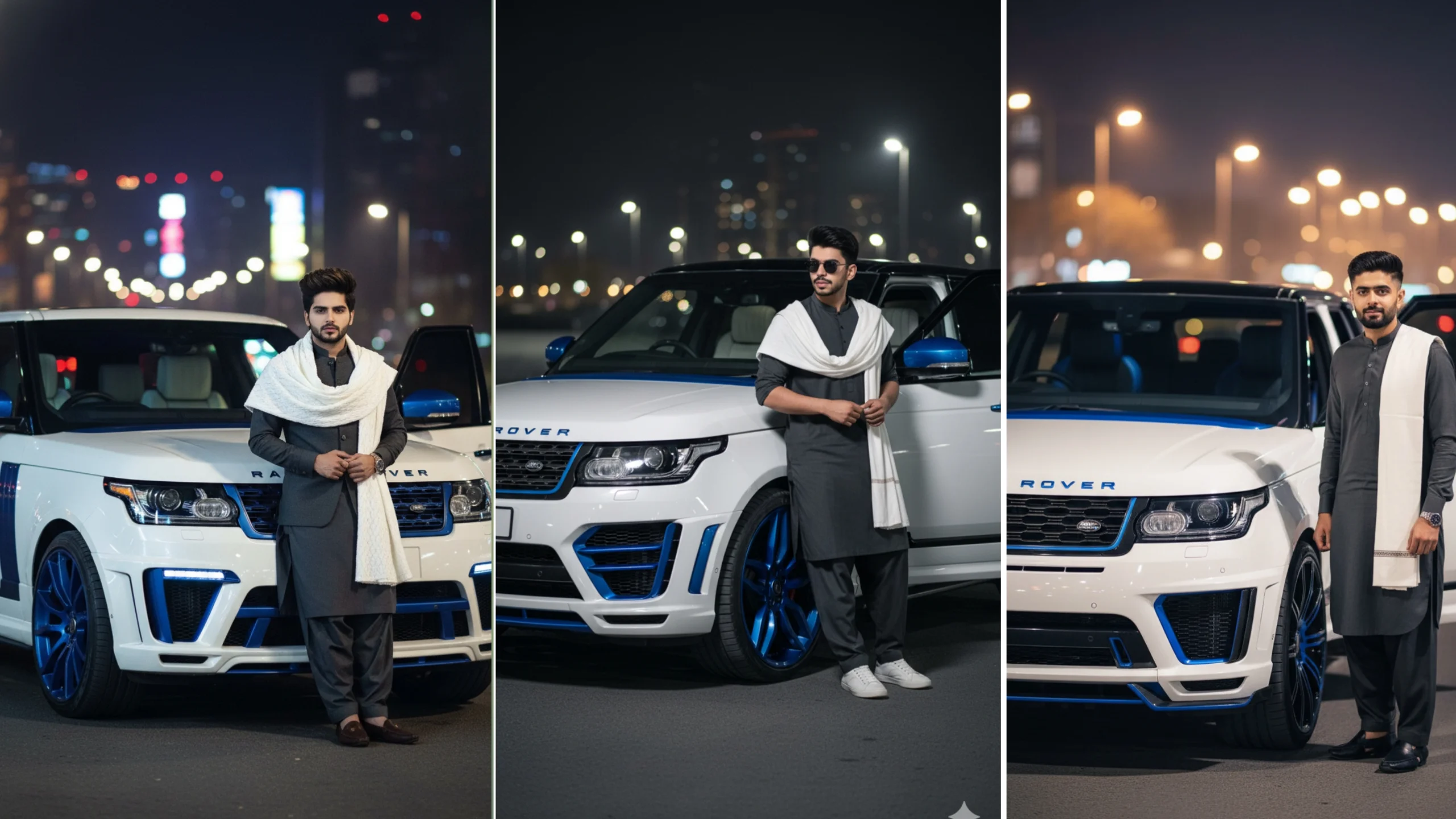
AI image generation has become one of the biggest creative trends, and Google’s AI ecosystem is helping millions of users create realistic artwork, videos, and written content using simple text prompts. Whether you want to design luxury cars, create cinematic portraits, or generate professional content, Google’s AI tools offer plenty of possibilities.
In this guide, you’ll learn what Google Gemini is, how Google Veo and Google AI Studio differ, and how to write better car prompts to create impressive AI-generated images.
What Is Google Gemini?
Google Gemini is Google’s multimodal AI model developed to understand and generate different types of content, including text, images, code, audio, and more. Instead of focusing on only one type of input, Gemini can process multiple formats together, making it useful for both everyday users and professionals.
People use Gemini for tasks such as:
- Writing articles and emails
- Brainstorming ideas
- Creating image prompts
- Learning new topics
- Coding assistance
- Research and summarization
Its ability to understand context allows users to generate more detailed and personalized results with simple instructions.
Why Are Gemini Prompts So Popular?
A prompt is simply the instruction you give the AI.
The quality of your prompt directly affects the final result. A short prompt may generate a basic image, while a detailed prompt usually produces more realistic and visually appealing output.
For example, instead of writing:
White SUV.
A stronger prompt would describe:
- The vehicle model
- Environment
- Lighting
- Camera angle
- Clothing
- Mood
- Colors
- Photography style
These details help the AI better understand the scene you want to create.
Example of a Blue Modified Car Prompt
Here’s an example of a detailed prompt suitable for creating a luxury automotive image:
Blue Modified Range Rover Prompt
A confident young Asian man stands beside the driver’s side front wheel of a customized white Range Rover Vogue featuring blue accents on the grille, wheels, mirrors, and side panels. The vehicle is equipped with a premium wide-body styling kit inspired by luxury aftermarket designs. The driver’s door is open, revealing a modern interior. The man wears a charcoal gray shalwar kameez with a white shawl draped over one shoulder. The background features a vibrant city at night with soft bokeh lights reflecting on the wet streets. Cinematic lighting, ultra-realistic photography, shallow depth of field, HDR quality, 85mm lens, professional automotive portrait.
This style of prompt provides enough detail for AI models to generate realistic results without requiring additional instructions.
Tips for Writing Better Gemini Prompts
If you want higher-quality images, include more than just the subject.
Consider mentioning:
- Vehicle make and model
- Exterior colors
- Custom modifications
- Time of day
- Background location
- Camera angle
- Lens type
- Lighting style
- Clothing
- Facial expression
- Photography quality
The more descriptive your prompt, the better the generated image usually becomes.
Popular Car Prompt Ideas
If you’re looking for inspiration, here are a few creative concepts you can customize.
Luxury SUV at Night
A premium SUV parked beside a modern skyline with glowing city lights reflected on wet pavement.
Supercar in Neon Streets
A bright-colored supercar driving through a futuristic city illuminated by neon signs and cinematic lighting.
Classic Sports Car
A restored vintage sports car parked outside a traditional European street café during golden hour.
Desert Adventure
A luxury off-road vehicle crossing sand dunes at sunset with dramatic clouds and warm lighting.
Mountain Highway
A high-performance sports car driving along a winding mountain road with motion blur and realistic reflections.
These ideas can be adapted to almost any AI image generator.
What Is Google Veo?
Google Veo is Google’s AI-powered video generation technology. Instead of producing a single image, Veo can generate short videos from text descriptions.
Creators use it to produce:
- Cinematic scenes
- Product showcases
- Travel videos
- Animated landscapes
- Marketing content
- Social media clips
By describing movement, lighting, camera angles, and actions, users can create dynamic video sequences without traditional video editing.
What Is Google AI Studio?
Google AI Studio is a platform designed for developers and advanced users who want to experiment with Google’s AI models.
It allows users to:
- Test AI prompts
- Build AI-powered applications
- Explore different model responses
- Adjust generation settings
- Integrate AI into websites and software
While Gemini focuses on everyday AI assistance, AI Studio offers greater control for development and experimentation.
Gemini vs. Veo vs. AI Studio
Although these products are part of Google’s AI ecosystem, each serves a different purpose.
| Tool | Primary Purpose |
| Google Gemini | Text, images, coding, and AI conversations |
| Google Veo | AI video generation from text prompts |
| Google AI Studio | Building, testing, and integrating AI applications |
Choosing the right tool depends on the type of content you want to create.
How to Create Better AI Images
Many beginners focus only on describing the subject, but professional-looking images often include environmental details as well.
Try adding information such as:
- Weather conditions
- Lighting direction
- Camera focal length
- Color grading
- Clothing textures
- Background objects
- Reflection effects
- Photography style
These details give the AI much more creative direction and often produce noticeably better results.
Common Mistakes to Avoid
When writing prompts, avoid making them too vague.
Instead of:
- Car
- Nice background
- Good lighting
Try describing exactly what you want to see.
Also avoid:
- Contradictory instructions
- Overly long repetitive prompts
- Random keywords with no context
- Unrealistic combinations that confuse the AI
Simple, clear, and descriptive prompts generally work best.
Final Thoughts
Google’s AI tools continue to make creative work more accessible for everyone. Gemini helps generate detailed text and realistic images, Veo focuses on AI-powered videos, and AI Studio provides a flexible environment for developers and advanced users.
If your goal is creating impressive automotive artwork, spend time improving your prompt-writing skills. Clear descriptions, realistic settings, thoughtful lighting, and camera details can dramatically improve the final result, whether you’re designing luxury vehicles, cinematic portraits, or creative concept art.
