
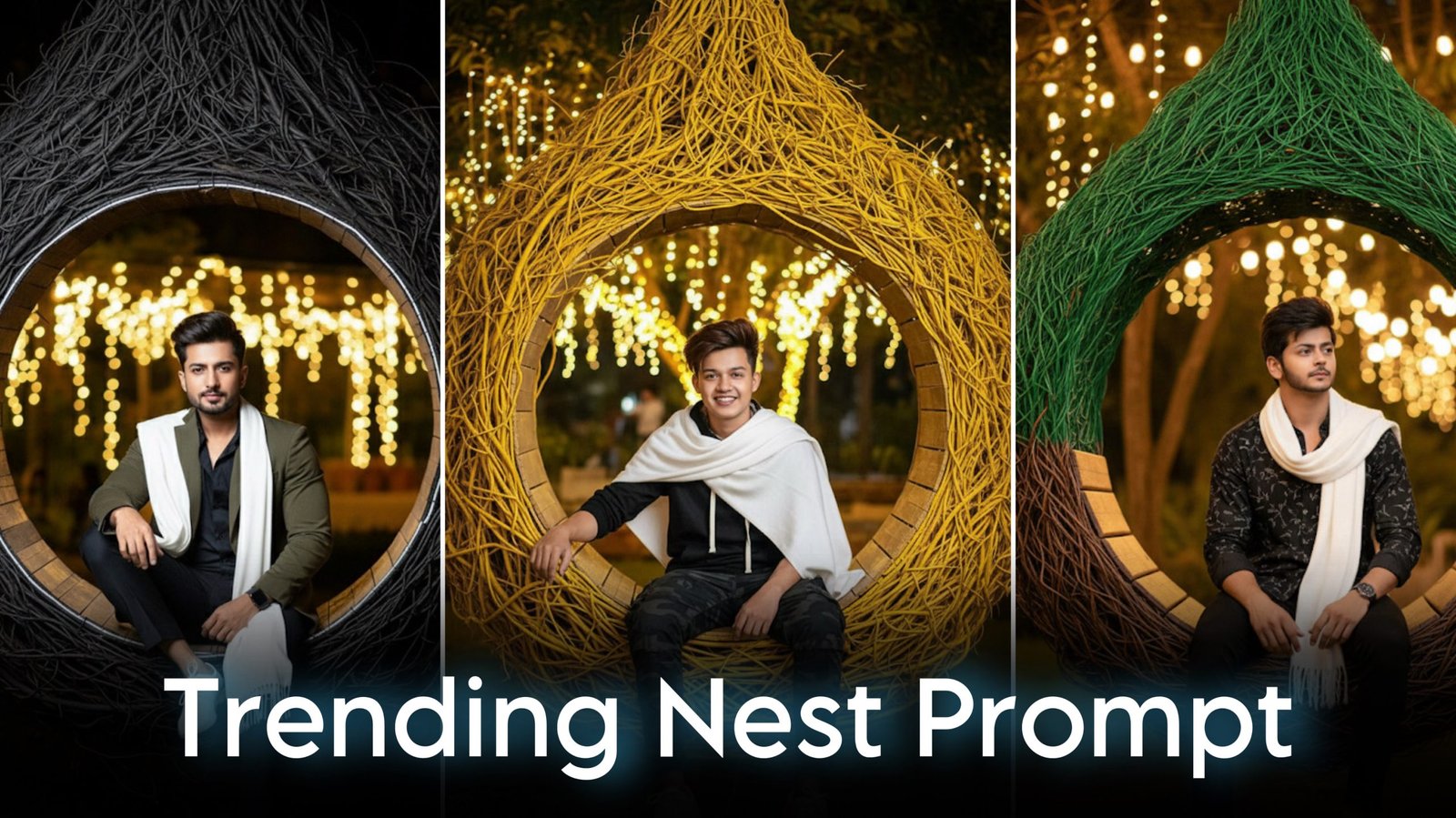
Nest-themed AI portraits have become one of the latest social media trends. These creative images place the subject inside a large woven nest surrounded by beautiful natural scenery, giving the portrait a unique and artistic appearance.
With Google Gemini and other AI image generators, you can create realistic nest portraits by combining a detailed prompt with a clear reference photo. This guide explains how these prompts work, provides a ready-to-use example, and shares practical tips for getting better results.
Note: For the most accurate results, upload your own photo or an image you have permission to use. Respect the privacy of others when creating AI-generated content.
What Is a Nest AI Photo Prompt?
A nest prompt tells the AI to place the subject inside a large decorative nest made from branches, vines, or woven natural materials. These nests are usually suspended in gardens, forests, or scenic outdoor locations to create a calm and cinematic atmosphere.
Most creators combine this setting with:
- Warm lighting
- Natural greenery
- Professional portrait photography
- Shallow depth of field
- Soft background blur
- Realistic textures
The result looks similar to a professionally photographed travel portrait.
Why Nest Portraits Are Trending
Nest-themed portraits are popular because they combine nature, fashion, and cinematic photography into a single image.
Many people use these AI-generated portraits for:
- Instagram profile pictures
- Facebook posts
- Pinterest content
- WhatsApp display photos
- Personal photo collections
Their clean background and premium editing style make them visually appealing without looking overly artificial.
Google Gemini Nest Trending Prompt
Upload your reference image before using the following prompt.
Prompt:
Create an ultra-realistic 4K cinematic portrait using the uploaded image for the exact face, hairstyle, and facial features. Preserve the facial identity completely without changing expressions or proportions. The subject is sitting comfortably inside a large circular hanging nest made from woven yellow-colored tree roots and natural branches. The nest is suspended in a beautifully landscaped night garden illuminated with warm decorative lighting. The person is wearing the same black outfit as shown in the uploaded image, with a clean white shawl draped naturally over both shoulders and white sneakers. The pose is relaxed and confident, with realistic body posture and natural hand placement. Add soft cinematic lighting, realistic shadows, shallow depth of field, highly detailed skin texture, premium color grading, DSLR photography, and ultra-sharp 4K resolution. Create a peaceful, artistic atmosphere with natural colors and professional portrait composition.
How to Write Better AI Image Prompts
A detailed prompt gives the AI a clearer understanding of your vision.
Include these elements whenever possible:
Describe the Subject
Mention details such as:
- Clothing
- Hairstyle
- Pose
- Facial expression
- Accessories
Explain the Environment
Instead of saying “beautiful background,” describe the location clearly.
Examples include:
- Botanical garden
- Bamboo forest
- Mountain viewpoint
- Lakeside park
- Flower garden
- Tropical rainforest
Specify the Lighting
Lighting dramatically affects the final result.
Popular choices include:
- Golden hour
- Soft daylight
- Moonlight
- Warm decorative lights
- Sunset glow
Photography Keywords That Improve Results
Professional photography terms often help AI produce more realistic portraits.
Useful keywords include:
- DSLR photography
- Portrait lens
- 85mm lens
- Ultra realistic
- Hyper detailed
- Soft natural shadows
- Cinematic lighting
- Editorial photography
- High dynamic range
- Shallow depth of field
These descriptions encourage the AI to generate images with a polished, professional look.
Customize Your Nest Portrait
You can easily personalize the scene by changing the surroundings.
Popular variations include:
Forest Nest
Place the hanging nest among tall trees with morning sunlight filtering through the leaves.
Mountain View
Position the nest overlooking valleys, rivers, or distant mountains.
Sunset Garden
Use warm orange and golden skies to create a peaceful evening atmosphere.
Tropical Paradise
Surround the nest with palm trees, colorful flowers, and lush greenery.
Tips for More Realistic AI Images
To achieve the best results:
- Upload a high-resolution reference photo.
- Keep the face clearly visible.
- Use detailed clothing descriptions.
- Avoid conflicting prompt instructions.
- Mention realistic skin textures.
- Include camera angle and lighting details.
Small improvements in the prompt can significantly enhance image quality.
Stay Safe While Using AI Image Generators
When creating AI-generated portraits, follow responsible practices.
Remember to:
- Use only photos you own or have permission to edit.
- Protect your personal information.
- Avoid creating deceptive or misleading images.
- Follow the usage policies of your chosen AI platform.
Using AI responsibly helps maintain trust and encourages ethical creativity.
Frequently Asked Questions
Can I use this prompt with Google Gemini?
Yes. The prompt is written to work well with AI image-generation systems. Available features may vary depending on the Gemini version you use.
Can I change the outfit?
Absolutely. Replace the clothing description with any casual, formal, or traditional outfit that suits your preferred style.
Can I change the nest color?
Yes. You can describe the nest using natural brown wood, golden bamboo, white branches, or other materials to match your creative vision.
Why should I upload a clear photo?
A high-quality reference image helps the AI preserve facial features more accurately and produce a more realistic portrait.
Final Thoughts
Nest-themed AI portraits offer a creative way to combine nature, fashion, and cinematic photography into a unique digital artwork. By using a detailed prompt, high-quality reference image, and realistic photography descriptions, you can generate portraits that look polished and professional.
Don’t be afraid to experiment with different backgrounds, lighting styles, and seasonal themes. Small changes to your prompt can lead to completely different artistic results, making each image feel fresh and personalized.
