
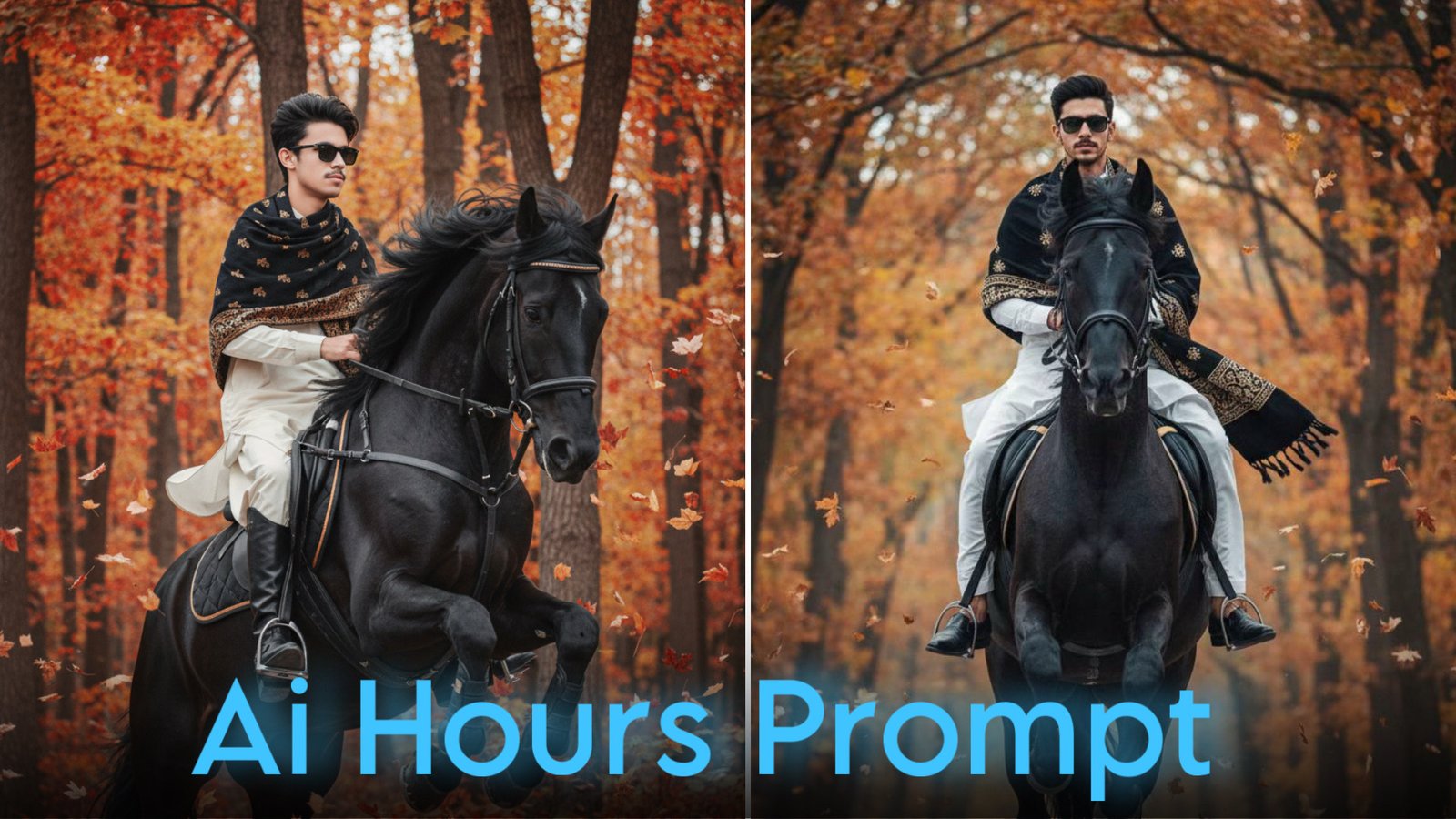
AI-generated horse portraits have become one of the biggest visual trends across Instagram, Facebook, TikTok, and Pinterest. With a detailed prompt and a high-quality reference photo, Google Gemini can generate dramatic portraits featuring powerful horses, luxury styling, and cinematic outdoor scenes.
Whether you’re creating a social media profile picture or experimenting with AI artwork, a well-structured prompt helps produce more realistic and visually appealing results.
Note: Always use your own photo or an image you have permission to edit. Avoid generating images that impersonate or misrepresent other people.
Why AI Horse Portraits Are Trending
Horse-themed AI portraits combine luxury photography with dramatic natural scenery, making them stand out on social media.
Popular elements include:
- Powerful horses
- Mountain landscapes
- Autumn forests
- Luxury clothing
- Cinematic lighting
- Professional photography
- Ultra-realistic editing
These features create portraits that resemble high-end editorial photography.
Google Gemini Black Horse Prompt
Upload your photo before using the following prompt.
Prompt:
Create an ultra-realistic 8K cinematic portrait using the uploaded image for the exact face, hairstyle, beard, and facial features. Preserve the facial identity completely without changing expressions or proportions. The subject is wearing a premium white Shalwar Kameez with a black and gold shawl draped naturally over both shoulders, black sunglasses, and polished black classic shoes. Show the subject riding a majestic black horse captured in mid-jump through a beautiful autumn forest filled with tall trees and gently falling golden leaves. Use a dramatic side camera angle with crisp facial detail, realistic horse anatomy, soft cinematic lighting, natural shadows, shallow depth of field, DSLR photography, Canon EOS R5 style, 35mm portrait lens, subtle film grain, cool autumn color grading, premium editorial atmosphere, and ultra-detailed 8K quality. Place the text “Sima Photography” in a small, elegant font in the upper-right corner of the image.
Google Gemini Luxury SUV Horse Prompt
If you prefer a modern luxury theme, try this prompt.
Prompt:
Generate an ultra-realistic cinematic portrait using the uploaded image for the exact face and hairstyle. Preserve facial identity without modification. The subject is standing confidently beside an open black luxury SUV while wearing a tailored black suit, black shirt, black dress shoes, and premium sunglasses. In one hand, the subject is holding the reins of a majestic black Shire horse with long white feathered legs. The background features a misty green landscape with towering trees, rolling hills, and soft morning fog. Add cinematic lighting, natural reflections, realistic horse textures, shallow depth of field, dramatic atmosphere, editorial photography, DSLR quality, premium color grading, and ultra-high-resolution 8K output.
How to Write Better Horse AI Prompts
Detailed prompts help AI image generators understand exactly what you want.
Try including these elements:
Subject
Describe:
- Clothing
- Hairstyle
- Accessories
- Pose
- Facial expression
Horse Details
Specify the horse clearly.
For example:
- Black Friesian horse
- White Arabian horse
- Shire horse
- Mustang
- Andalusian horse
You can also mention:
- Running
- Jumping
- Standing
- Rearing
- Walking beside the subject
Background
Choose a detailed environment such as:
- Autumn forest
- Snow-covered mountains
- Green countryside
- Desert landscape
- Historic castle
- Lakeside meadow
The more specific your description, the more consistent the AI’s output is likely to be.
Photography Keywords That Improve Results
Professional photography terms often produce more realistic images.
Useful phrases include:
- DSLR photography
- Canon EOS R5
- 35mm lens
- 85mm portrait lens
- Cinematic lighting
- Soft natural shadows
- Ultra realistic
- Hyper detailed
- High dynamic range
- Editorial photography
- Shallow depth of field
- Fine film grain
These keywords encourage the AI to create polished, professional-looking portraits.
Customize Your Horse Portrait
You can easily change the overall theme by editing the prompt.
Popular variations include:
Royal Horse Portrait
Place the subject outside a grand palace or historic castle with elegant architecture.
Mountain Adventure
Create a dramatic landscape with rocky mountains, rivers, and misty valleys.
Golden Sunset Ride
Use warm sunset lighting with long shadows and golden skies.
Winter Horse Scene
Generate a snowy forest with soft falling snow and cool blue lighting.
Tips for Better AI Results
For the best images:
- Upload a clear, high-resolution photo.
- Keep your face visible.
- Describe the horse in detail.
- Mention realistic lighting.
- Include camera angle and photography style.
- Avoid conflicting instructions.
A well-organized prompt usually produces cleaner and more realistic images.
Use AI Responsibly
AI image generators are powerful creative tools, but they should be used responsibly.
Keep these guidelines in mind:
- Use only photos you own or have permission to edit.
- Respect copyright and privacy.
- Avoid creating misleading or deceptive images.
- Follow the terms and policies of your chosen AI platform.
Responsible use helps ensure a positive experience for everyone.
Frequently Asked Questions
Can I use these prompts in Google Gemini?
Yes. These prompts are designed for AI image-generation systems. Image-generation features depend on the Gemini version and capabilities available to your account.
Can I replace the black horse with another breed?
Absolutely. You can request any horse breed or color, such as a white Arabian, brown Mustang, gray Andalusian, or another breed that matches your preferred style.
Can I change the background?
Yes. Replace the forest with mountains, beaches, deserts, castles, gardens, or cityscapes to create different artistic themes.
How can I make the image more realistic?
Using a high-quality reference photo, detailed lighting descriptions, professional photography keywords, and clear scene instructions generally leads to more realistic results.
Final Thoughts
Google Gemini makes it easy to create cinematic horse portraits using detailed prompts and high-quality reference images. By describing the subject, horse, environment, lighting, and camera style clearly, you can generate striking AI artwork suitable for social media, digital portfolios, or personal projects.
Experiment with different horse breeds, outdoor locations, and photography styles to create portraits that match your vision. Small adjustments to your prompt can dramatically improve the final result and help you develop a unique visual style.
