
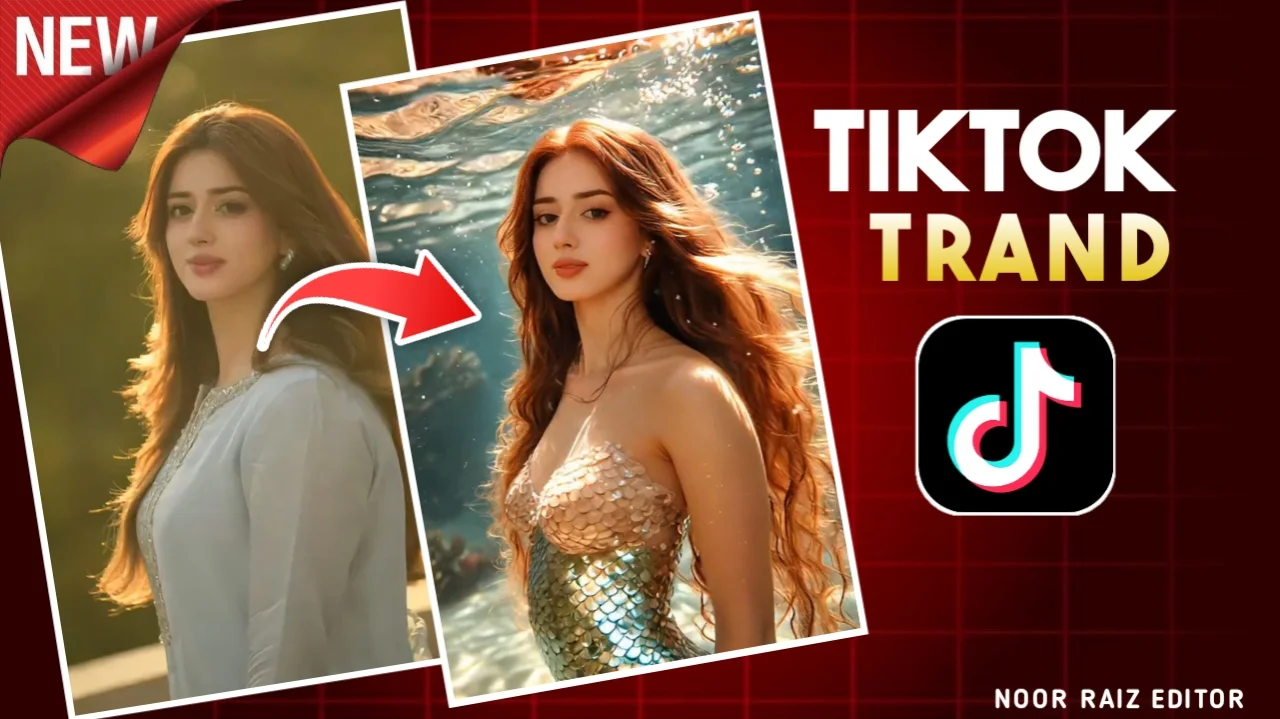
The TikTok AI Mermaid filter has become one of the most popular AI video trends across TikTok, Instagram Reels, and YouTube Shorts. Thousands of creators are transforming ordinary photos into eye-catching mermaid videos using artificial intelligence, creating clips that look like scenes from a fantasy movie.
The good news is that you don’t need professional editing skills to join the trend. Several AI tools can generate these effects automatically in just a few minutes.
In this guide, you’ll learn what the AI Mermaid trend is, how to create your own videos, and which AI tools produce the best results.
What Is the TikTok AI Mermaid Filter?
The AI Mermaid filter is a visual effect that transforms a normal photo or short video into a fantasy-style mermaid character.
Instead of applying a simple filter, AI analyzes the uploaded image and generates new details such as:
- A realistic mermaid tail
- Ocean-themed backgrounds
- Long flowing hair
- Water reflections
- Magical lighting
- Underwater visual effects
The result is a cinematic animation that looks much more advanced than a traditional social media filter.
Why Is the AI Mermaid Trend So Popular?
There are several reasons this trend has gained millions of views.
People enjoy it because it:
- Creates unique fantasy-style videos
- Requires very little editing experience
- Produces high-quality results quickly
- Works well for TikTok, Instagram, and Shorts
- Allows creators to personalize their videos
Since AI handles most of the editing, even beginners can create professional-looking content.
How to Create an AI Mermaid Video
Most AI platforms follow a similar process.
Step 1: Choose an AI Video Generator
Select an AI tool that supports image-to-video or AI animation.
Many platforms can transform a single portrait into an animated scene.
Step 2: Upload a Clear Photo
For the best results, use a high-quality image with:
- Good lighting
- A clear face
- Minimal background distractions
- High resolution
Clear photos usually generate more realistic animations.
Step 3: Select a Mermaid Style
Many AI tools offer built-in themes or styles.
Depending on the platform, you may find options like:
- Fantasy Mermaid
- Ocean Princess
- Underwater Magic
- Disney-inspired fantasy style
- Cinematic Ocean Scene
Some tools also allow you to customize colors, backgrounds, and lighting.
Step 4: Generate the Video
After choosing your style, start the AI generation process.
Depending on the platform and video quality, rendering usually takes a few seconds to several minutes.
Step 5: Download and Share
Once processing is complete, you can download your finished video and share it on your preferred social media platform.
Best AI Tools for Mermaid Videos
Several AI video generators can create similar effects.
PixVerse AI
PixVerse AI is popular for image-to-video generation and supports cinematic animations with smooth camera movement.
Features include:
- AI image animation
- Multiple visual styles
- HD video output
- Beginner-friendly interface
Pika
Pika allows users to generate short AI videos from images or text prompts.
It’s suitable for social media creators who want quick results.
Runway
Runway offers more advanced editing tools alongside AI video generation.
It works well for creators who want greater control over the final result.
Kaiber AI
Kaiber specializes in artistic video generation and is frequently used for music videos and fantasy-themed animations.
Its creative visual styles are ideal for cinematic AI effects.
Tips for Better AI Mermaid Videos
Small improvements to your input photo can noticeably improve the final animation.
For better results:
- Use portrait photos with good lighting.
- Avoid blurry or low-resolution images.
- Choose a simple background.
- Upload images where your face is fully visible.
- Experiment with different prompts or styles.
Sometimes generating the same image multiple times produces even better results.
Can You Create Mermaid Videos from Text?
Yes.
Many AI platforms now support text-to-video generation, allowing you to describe the scene instead of uploading an image.
For example, you might describe:
- A glowing mermaid swimming through a crystal-clear ocean
- A fantasy underwater kingdom with magical sea creatures
- A cinematic mermaid surrounded by colorful coral reefs
The AI then creates a short animated video based on your description.
The final quality depends on the platform and the detail included in your prompt.
Why Creators Use AI Mermaid Videos
AI-generated fantasy videos are popular because they attract attention quickly.
Many creators use them for:
- TikTok videos
- Instagram Reels
- YouTube Shorts
- Digital art projects
- Creative storytelling
- Portfolio showcases
Since fantasy content often performs well on short-form video platforms, these effects have become a favorite among content creators.
Things to Keep in Mind
Although AI video generators are becoming more powerful, results may vary.
Factors that affect quality include:
- The AI platform you use
- Your original image quality
- Internet connection
- Video resolution settings
- Rendering time
Free versions may include watermarks, lower resolution, or daily generation limits.
Frequently Asked Questions
Is the TikTok AI Mermaid filter free?
Some AI tools offer free plans with limited features, while others require a subscription for higher-quality exports and additional styles.
Do I need editing experience?
No. Most AI generators are designed for beginners and require only a few simple steps.
Can I use my own photo?
Yes. Most image-to-video AI tools allow you to upload your own portrait before generating the animation.
Which AI tool creates the best Mermaid videos?
Popular choices include PixVerse AI, Runway, Pika, and Kaiber. The best option depends on your preferred editing style and output quality.
Can I share AI Mermaid videos on social media?
Yes. Most platforms let you download your finished video so you can post it on TikTok, Instagram Reels, YouTube Shorts, and other social media platforms.
Final Thoughts
The TikTok AI Mermaid filter trend shows how quickly AI is changing digital content creation. With modern image-to-video generators, anyone can transform an ordinary photo into a fantasy-inspired animation without advanced editing skills.
Whether you’re creating content for social media, experimenting with AI art, or simply trying the latest viral trend, these tools make it easy to produce engaging videos in just a few clicks. Try different styles, use high-quality photos, and experiment with creative prompts to achieve the best possible results.
