
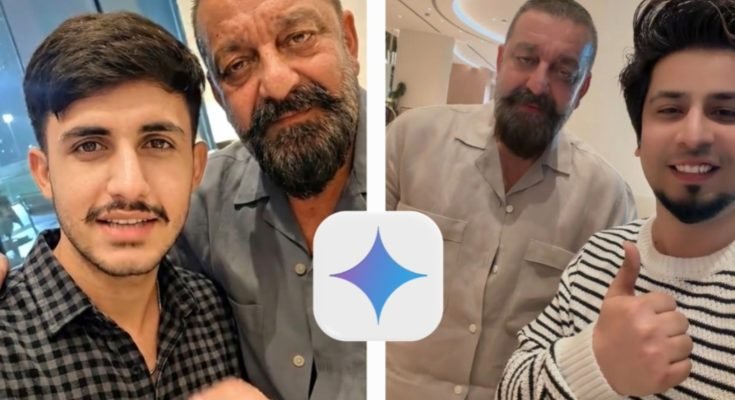
AI-generated celebrity-style photos have become one of the biggest trends on social media. Many creators are using Google Gemini and other AI image tools to create cinematic portraits inspired by famous actors, stylish locations, and realistic photography.
One popular trend is creating AI artwork featuring Sanjay Dutt in dramatic settings such as luxury malls, city skylines, snowy landscapes, or cinematic streets. The quality of these images depends largely on how well the prompt is written.
Note: When creating AI images of public figures, respect applicable laws and platform policies, and avoid using them in ways that could mislead others or imply endorsement.
Why Celebrity AI Prompts Are Trending
AI image generators now understand much more detailed descriptions than earlier models. Instead of writing a short sentence, users can describe:
- Clothing
- Camera angle
- Facial expression
- Background
- Lighting
- Photography style
- Mood
- Lens effects
The more specific your prompt, the more realistic the final image usually becomes.
This has made celebrity-inspired portraits especially popular on Instagram, Pinterest, YouTube thumbnails, and other social media platforms.
What Makes a Good Gemini Image Prompt?
A strong prompt contains several important elements.
1. Subject
Start by describing who appears in the image.
Example:
- A young man
- A businessman
- A traveler
- A public figure
- Friends standing together
2. Clothing
Detailed clothing descriptions help create realistic results.
For example:
- Black shalwar kameez
- White kurta
- Casual denim jacket
- Leather boots
- Luxury wristwatch
Adding colors and fabric details often improves accuracy.
3. Location
Choose a setting that matches the mood.
Popular locations include:
- Luxury shopping mall
- Dubai skyline
- Mountain landscape
- Snow-covered street
- Desert sunset
- Modern city rooftop
A detailed background creates a more cinematic composition.
4. Lighting
Lighting is one of the biggest factors affecting realism.
Common styles include:
- Golden hour
- Soft daylight
- Studio lighting
- Night photography
- Neon lighting
- Sunset
- Blue hour
Good lighting descriptions produce more natural-looking images.
5. Camera Style
Adding photography terms can improve the overall quality.
Examples include:
- Full-body portrait
- Close-up portrait
- DSLR photography
- Ultra-realistic
- Cinematic composition
- Shallow depth of field
- Soft bokeh background
- High-detail skin textures
Example Gemini Prompt
You can use a prompt similar to this and customize it for your own creative project:
Prompt Example
A cinematic full-body portrait of a stylish young man standing beside Indian actor Sanjay Dutt inside a luxurious modern shopping mall. The young man is wearing a mustard-colored traditional shalwar kameez with a wristwatch, while Sanjay Dutt is dressed in an elegant white traditional outfit. Warm indoor lighting, polished marble floors, luxury storefronts, realistic facial details, soft shadows, natural skin textures, DSLR photography, ultra-realistic quality, shallow depth of field, premium editorial style.
You can change the location, clothing, lighting, or mood to create a unique result.
Popular AI Photo Styles
Many creators experiment with different visual themes.
Luxury Mall Portraits
Modern shopping malls create a clean, premium atmosphere with reflective floors and elegant lighting.
City Night Photography
Bright city lights, skyscrapers, and blurred backgrounds produce dramatic portraits suitable for social media.
Desert Sunset
Golden sunlight and warm colors create cinematic outdoor scenes.
Snow Landscapes
Adding snowfall creates a peaceful and stylish winter atmosphere.
Traditional Fashion
Traditional South Asian clothing combined with cinematic photography has become especially popular among AI artists.
Tips for Better Gemini Results
Small prompt improvements often make a big difference.
Try these suggestions:
- Describe clothing in detail.
- Mention realistic skin textures.
- Specify camera angles.
- Include lens effects like soft bokeh.
- Describe the background clearly.
- Mention lighting conditions.
- Use photography-related keywords naturally.
Avoid writing extremely short prompts if you’re aiming for realistic results.
Common Prompt Mistakes
Many beginners don’t get the results they expect because their prompts are too vague.
Avoid:
- Very short descriptions
- Conflicting instructions
- Too many unrelated objects
- Missing lighting information
- No camera perspective
Clear, structured prompts usually produce more consistent images.
Best Uses for AI Portraits
Realistic AI images can be useful for many creative projects, including:
- Social media artwork
- YouTube thumbnails
- Creative design concepts
- Personal digital art collections
- Graphic design inspiration
- Blog featured images
If you’re using AI-generated images commercially, make sure you understand the licensing terms of the platform you’re using.
Frequently Asked Questions
Does Google Gemini generate realistic images?
Gemini can generate or assist with image creation depending on the features available in your region and the Google services you’re using. Results improve with detailed prompts.
How long should an AI prompt be?
There is no fixed length, but prompts with clear descriptions of the subject, environment, lighting, and style usually perform better than very short prompts.
Can I change the background?
Yes. Most AI image generators allow you to describe almost any environment, such as cities, mountains, shopping malls, beaches, or snowy landscapes.
Why do some AI images look unrealistic?
Unclear prompts, conflicting instructions, or a lack of detail can lead to inconsistent results. Refining your prompt often improves the output.
Final Thoughts
Creating cinematic AI portraits with Google Gemini starts with writing detailed, well-structured prompts. By describing the subject, clothing, lighting, camera style, and environment, you can generate images that look polished and visually engaging.
Experiment with different locations, moods, and photography styles to develop your own unique creative approach. A few thoughtful adjustments to your prompt can significantly improve the realism and overall quality of your AI-generated artwork.
