
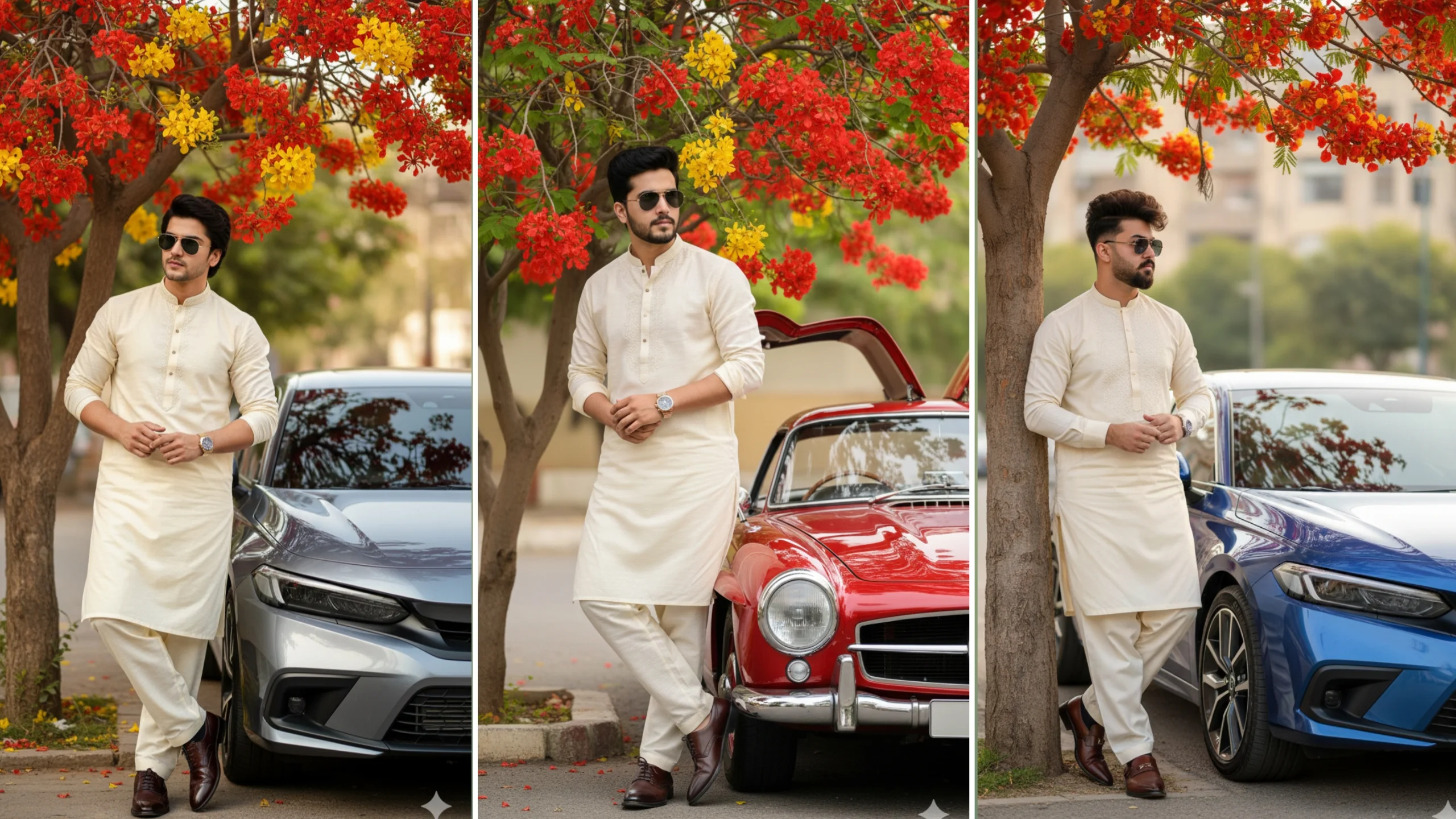
Traditional fashion has become one of the biggest trends in AI image generation. Across Instagram, Pinterest, Facebook, and YouTube, creators are generating cinematic portraits featuring elegant half white or cream-colored outfits, luxury accessories, and realistic outdoor backgrounds.
One of the most popular styles combines a traditional shalwar kameez with modern photography effects such as shallow depth of field, golden-hour lighting, luxury cars, and natural scenery.
Note: If you’re creating an AI portrait based on yourself or another identifiable person, make sure you have permission to use their image.
Why Half White Outfit Prompts Are Trending
Traditional clothing remains one of the most popular themes in AI-generated photography because it combines timeless fashion with modern cinematic effects.
Creators often choose cream, ivory, or off-white outfits because they work well with:
- Golden sunlight
- Green landscapes
- Luxury vehicles
- Floral gardens
- Desert backgrounds
- Urban city scenes
These colors also help create clean, premium-looking portraits suitable for social media.
Understanding Google Gemini Image Prompts
Google Gemini performs best when prompts include detailed descriptions rather than a few simple words.
Instead of writing:
Man in white clothes.
A stronger prompt explains:
- Clothing
- Pose
- Location
- Lighting
- Camera angle
- Background
- Photography style
- Facial expression
- Accessories
Detailed prompts usually produce more consistent and realistic images.
Key Elements of a Good Outfit Prompt
Describe the Clothing
Mention the outfit clearly.
Examples include:
- Cream embroidered shalwar kameez
- Half white traditional attire
- Ivory kurta with matching trousers
- Luxury leather shoes
- Designer wristwatch
Adding embroidery, fabric texture, and color tones helps improve the final result.
Choose an Interesting Background
The location changes the mood of the image.
Popular choices include:
- Flower gardens
- Mountain landscapes
- Luxury villas
- Desert roads
- Modern city streets
- Luxury shopping malls
- Lakeside parks
A well-designed background creates a more cinematic appearance.
Add Realistic Lighting
Lighting has a major impact on realism.
Common options include:
- Golden hour
- Warm sunset
- Natural daylight
- Soft cloudy light
- Studio portrait lighting
- Evening city lights
Natural lighting usually creates the most realistic portraits.
Include Camera Details
Photography terms can improve composition.
Useful descriptions include:
- Full-body portrait
- DSLR photography
- Editorial fashion style
- Ultra-realistic
- High-resolution
- Soft background blur
- Shallow depth of field
- Natural skin texture
These details help AI understand the desired photographic style.
Example Google Gemini Prompt
Here’s an example you can customize for your own creative project.
Prompt Example
A hyper-realistic full-body portrait of a stylish young man wearing a cream-colored embroidered shalwar kameez with elegant brown leather shoes, a premium wristwatch, and classic aviator sunglasses. He is standing beside a modern Honda Civic in a beautiful garden filled with colorful flowering trees. Warm golden-hour sunlight, realistic skin texture, cinematic composition, DSLR photography, ultra-detailed clothing fabric, soft shadows, shallow depth of field, luxury editorial fashion style.
You can replace the location, vehicle, outfit color, or accessories to create a completely different result.
Popular Background Ideas
Many creators experiment with different environments to make their portraits stand out.
Luxury Garden
A peaceful park filled with flowers creates a fresh and elegant atmosphere.
City Streets
Modern buildings and evening lights produce fashionable urban portraits.
Desert Landscape
Golden sand and warm sunlight give images a dramatic cinematic look.
Snowy Mountains
Winter scenes add a calm and premium aesthetic.
Luxury Cars
Vehicles are often included as background elements to enhance the composition rather than dominate the image.
Tips for Better AI Portraits
If you want more realistic images, try these suggestions:
- Describe clothing materials.
- Mention natural facial expressions.
- Specify camera distance.
- Include realistic lighting.
- Add background details.
- Describe weather conditions.
- Use photography-related keywords naturally.
Small prompt improvements often produce noticeably better results.
Common Prompt Mistakes
Many beginners receive inconsistent images because their prompts are too general.
Avoid:
- One-line prompts
- Conflicting instructions
- Too many unrelated objects
- Missing lighting details
- No camera perspective
- Unrealistic combinations of styles
Keeping your prompt organized makes it easier for the AI to understand your vision.
Best Uses for Outfit Prompts
These AI-generated portraits are commonly used for:
- Social media artwork
- Pinterest pins
- Fashion inspiration
- YouTube thumbnails
- Personal creative projects
- Digital design concepts
Always review the usage rights of the AI platform before using generated images commercially.
Frequently Asked Questions
Does Google Gemini create realistic portraits?
Gemini can generate or assist with image creation depending on the available features and Google services. Detailed prompts generally produce better results.
Which outfit colors work best?
Neutral colors such as cream, ivory, beige, black, and white often create clean and elegant-looking portraits.
Should I include camera settings?
Including photography terms like DSLR, shallow depth of field, and cinematic lighting can improve the overall appearance.
Can I change the background?
Yes. You can describe almost any environment, including parks, shopping malls, mountains, beaches, snowy forests, or luxury streets.
Final Thoughts
Half white outfit prompts remain one of the most popular AI photography trends because they combine traditional fashion with modern cinematic styling. By describing clothing, lighting, background, and photography details clearly, you can generate polished portraits that look both realistic and visually striking.
Experiment with different locations, accessories, and lighting styles to develop your own creative look. Even small changes to your prompt can dramatically improve the quality of the final image.
