
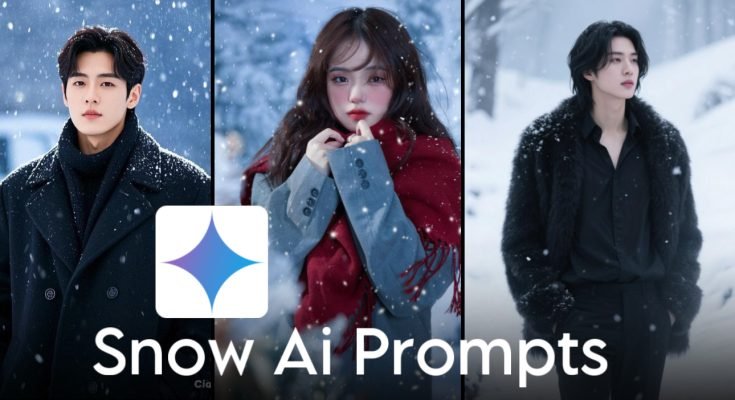
AI photo editing has made it easier than ever to transform ordinary pictures into cinematic artwork. One of the biggest visual trends is the AI Snow Effect, where a normal photo is turned into a realistic winter scene with falling snow, soft lighting, and a cozy seasonal atmosphere.
Whether you’re creating content for Instagram, Pinterest, Facebook, or YouTube, the snow effect can give your photos a dramatic new look without needing to visit a snowy location.
This guide explains how the AI snow effect works, how to write better prompts, and how to create realistic winter images.
What Is the AI Snow Effect?
The AI snow effect is a style of image editing that adds realistic winter elements to an existing photo or generates a brand-new snowy scene from a text prompt.
Depending on the AI tool you use, it can create effects such as:
- Falling snowflakes
- Snow-covered trees
- Frost on clothing
- Misty winter backgrounds
- Soft winter sunlight
- Snow-covered streets and mountains
Modern AI models can blend these effects naturally while preserving the overall composition of the image.
Why Is the Snow Effect So Popular?
Winter-themed edits have become a popular choice because they create a calm and cinematic atmosphere.
Creators often use snow effects for:
- Social media profile pictures
- YouTube thumbnails
- Pinterest pins
- Digital artwork
- Holiday-themed posts
- Creative photo edits
The soft lighting and snowy environment often make portraits appear more dramatic and visually appealing.
How to Write a Better AI Snow Prompt
The quality of the final image depends heavily on the prompt you provide.
A strong prompt usually includes:
Subject
Clearly describe the person or object.
Examples include:
- Young man
- Woman standing outdoors
- Couple
- Traveler
- Mountain landscape
Clothing
Mention the clothing in detail.
For example:
- Black shalwar kameez
- Winter jacket
- Wool scarf
- Leather boots
- Gloves
- Beanie
Weather
Describe the snowfall.
Examples:
- Light snowfall
- Heavy snowstorm
- Gentle snowflakes
- Fresh snowfall
- Blizzard conditions
Lighting
Good lighting creates more realistic results.
Popular choices include:
- Golden hour
- Soft daylight
- Blue hour
- Overcast winter sky
- Sunset
- Cinematic lighting
Background
Complete the scene with a detailed environment.
Examples include:
- Snow-covered forest
- Mountain village
- Frozen lake
- Winter street
- Pine trees
- Wooden cabin
Example AI Snow Effect Prompt
You can use a prompt like this as a starting point and customize it to fit your own image:
Prompt Example
Transform this portrait into a realistic winter scene with gentle falling snow, soft golden-hour lighting, snow-covered trees in the background, subtle mist, natural skin tones, ultra-realistic textures, shallow depth of field, DSLR photography, cinematic composition, high detail, and a peaceful winter atmosphere while preserving the person’s facial features.
Adding descriptive details usually produces better results than using very short prompts.
Changing an Outfit with AI
Many AI image editors also allow you to change clothing while keeping the same person and background.
For example, you can describe:
- Winter coats
- Hoodies
- Sweaters
- Scarves
- Boots
- Gloves
- Hats
A detailed clothing description helps the AI generate more natural-looking results.
Tips for More Realistic Results
If you want professional-looking winter images, keep these tips in mind:
- Use detailed lighting descriptions.
- Mention realistic skin textures.
- Specify camera angles.
- Include weather conditions.
- Describe clothing clearly.
- Keep prompts consistent.
- Avoid giving conflicting instructions.
Small adjustments often produce much better images.
Common Mistakes
Many beginners don’t achieve realistic results because they:
- Use very short prompts.
- Forget to describe lighting.
- Don’t mention the background.
- Mix multiple art styles.
- Add too many unrelated details.
Keeping your prompt focused generally leads to better output.
Where Can You Use AI Snow Photos?
Winter-style AI images work well for many creative projects.
Popular uses include:
- Social media posts
- YouTube banners
- Blog featured images
- Seasonal marketing campaigns
- Digital wallpapers
- Holiday greeting cards
If you’re creating images for commercial purposes, review the usage terms of the AI platform you’re using.
Frequently Asked Questions
Can AI add snow to an existing photo?
Yes. Many AI image editing tools can apply realistic snowfall and winter scenery while preserving the main subject.
Do I need a snowy background?
No. AI can often transform ordinary outdoor photos into winter scenes through image editing or text prompts.
How do I make the snow look realistic?
Include details such as snowflake size, lighting, background, camera style, and weather conditions in your prompt.
Which photography style works best?
Cinematic lighting, shallow depth of field, realistic textures, and natural color grading usually produce the most realistic winter portraits.
Final Thoughts
The AI snow effect is one of the easiest ways to create eye-catching winter portraits without waiting for snowy weather. By combining detailed prompts with realistic lighting, weather descriptions, and thoughtful composition, you can transform ordinary photos into cinematic seasonal artwork.
Experiment with different snowfall intensities, locations, and clothing styles to create unique winter images that match your creative vision while keeping the final result natural and visually appealing.
