
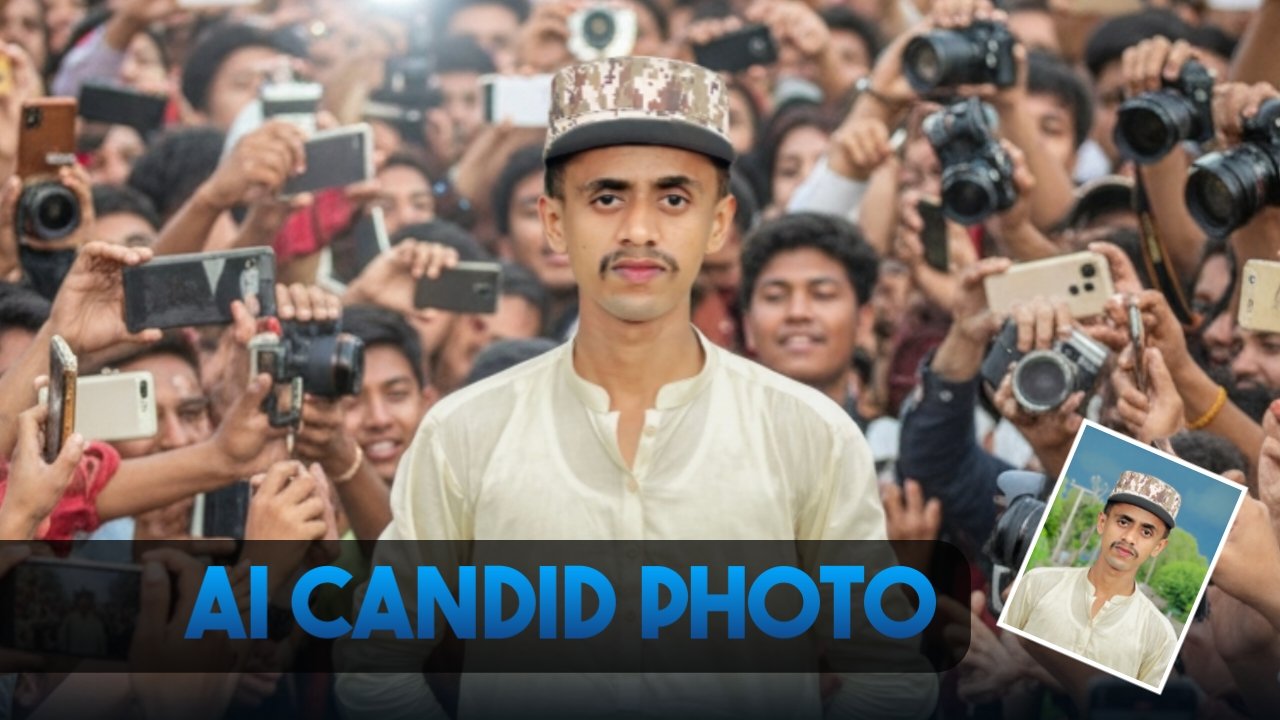
AI image generation has made it possible for anyone to create professional-looking photos from simple text prompts. One of the biggest trends right now is the AI candid photo style, where images look like they were captured naturally instead of being professionally posed.
Using tools like Google Gemini, Google AI Studio, and other AI image generators, you can create lifelike portraits, travel photos, celebrity-style moments, and everyday scenes with just a detailed prompt.
This guide explains how the AI candid photo trend works, how to write better prompts, and includes ready-to-use examples you can customize.
What Is the AI Candid Photo Trend?
A candid photo is an image that captures a person naturally instead of asking them to pose for the camera. AI generators can now recreate this style with realistic lighting, natural expressions, slight motion blur, and authentic backgrounds.
Instead of looking like a studio photoshoot, the final image resembles a real photograph taken by someone nearby.
Popular AI candid photos include:
- Airport travel photos
- Street photography
- Coffee shop moments
- Celebrity-style crowd scenes
- Shopping mall portraits
- College campus photos
- Concert audiences
- Beach walks
- Café conversations
- City nightlife
The goal is to make the image feel spontaneous and believable.
What Is Google Gemini?
Google Gemini is Google’s advanced AI model capable of understanding text, images, and other types of information. It can generate detailed responses and, depending on the platform and available features, assist with creating high-quality AI-generated images from descriptive prompts.
The model understands context better than many earlier AI systems, allowing it to generate scenes with realistic compositions, lighting, and visual details.
What Is Google AI Studio?
Google AI Studio is Google’s workspace for experimenting with Gemini models and AI-powered workflows.
It allows users to:
- Test prompts
- Experiment with AI features
- Refine outputs
- Build AI-powered projects
- Explore creative ideas
Depending on the available features in your account or region, image generation capabilities may vary.
How to Write Better AI Image Prompts
The quality of an AI-generated image depends largely on the prompt you provide.
Here are a few simple rules.
Describe the Subject Clearly
Instead of writing:
A man
Write something like:
A 24-year-old man wearing a black jacket, white T-shirt, dark jeans, and white sneakers.
Specific details usually produce better results.
Mention the Environment
Describe where the subject is.
Examples include:
- Busy airport
- Modern coffee shop
- Mountain viewpoint
- Shopping mall
- Sunset beach
- Rainy city street
The environment helps AI create a more believable scene.
Include Lighting Details
Lighting has a huge impact on realism.
Examples:
- Golden hour sunlight
- Soft morning light
- Natural daylight
- Overcast weather
- Warm indoor lighting
- Cinematic evening glow
Describe the Camera Style
Adding photography-related terms often improves realism.
Examples include:
- DSLR photography
- 85mm portrait lens
- Documentary photography
- Photojournalism
- Slight motion blur
- Natural depth of field
- High dynamic range
Mention Facial Expression
Natural expressions make candid photos look more authentic.
Examples:
- Relaxed smile
- Looking away from the camera
- Casual expression
- Laughing naturally
- Deep in conversation
- Walking confidently
Prompt 1: Celebrity-Style Candid Photo
Ultra-realistic candid street photograph of a young adult walking confidently through a crowded public area. People around are holding smartphones and cameras while trying to capture photos naturally. The atmosphere feels energetic but realistic, with authentic facial expressions, natural daylight, slight motion blur, DSLR photography, shallow depth of field, highly detailed skin texture, realistic clothing folds, documentary-style photography, cinematic color grading, and a genuine celebrity-like public appearance. Aspect ratio 9:16.
Prompt 2: Airport Travel Portrait
Ultra-realistic travel photograph of a young traveler sitting comfortably in a modern airport waiting area. Wearing a white T-shirt, black jacket, black trousers, and clean white sneakers. A black backpack rests beside the chair, while a medium-sized travel suitcase with travel stickers stands nearby. Large airport windows reveal a commercial airplane parked outside with a bright blue sky. Natural lighting, realistic reflections, DSLR photography, travel magazine quality, authentic airport atmosphere, highly detailed facial features, candid composition, 9:16 aspect ratio.
Prompt 3: Coffee Shop Lifestyle Photo
Ultra-realistic candid photograph of a young professional sitting inside a modern coffee shop using a laptop while enjoying a cup of coffee. Warm natural window light, blurred customers in the background, relaxed atmosphere, documentary photography, realistic textures, soft depth of field, premium lifestyle magazine quality, highly detailed face, natural expression, 4K realism.
Prompt 4: City Street Portrait
Ultra-realistic candid portrait of a young person walking through a vibrant downtown street filled with shops, traffic, and pedestrians. Golden hour lighting, realistic reflections on buildings, fashionable casual clothing, natural smile, cinematic photography, shallow depth of field, highly detailed facial features, DSLR quality, authentic urban lifestyle, ultra-realistic image.
Tips for More Realistic AI Images
To improve your results:
- Add detailed clothing descriptions.
- Specify the time of day.
- Mention realistic camera settings.
- Include natural lighting instead of artificial lighting where appropriate.
- Keep prompts specific but easy to understand.
- Regenerate the image with small prompt changes if needed.
Small adjustments often produce noticeably different results.
Common Mistakes to Avoid
Many beginners use prompts that are too short.
Instead of writing:
Person standing outside.
Try:
Young man standing outside a modern shopping mall during golden hour, wearing casual streetwear, natural smile, DSLR photography, shallow depth of field, ultra-realistic textures, documentary photography.
Adding meaningful details usually produces better images.
Where Can You Use AI Candid Images?
AI-generated candid photos can be useful for many creative projects, including:
- Social media posts
- Blog featured images
- Digital artwork
- Marketing concepts
- Story illustrations
- Portfolio mockups
- YouTube thumbnails
- Presentation graphics
Before using AI-generated images commercially, review the licensing terms of the AI platform you’re using.
Frequently Asked Questions
What is an AI candid photo?
An AI candid photo is an image generated to resemble a naturally captured photograph rather than a posed portrait.
Which AI tools can generate candid photos?
Several AI image generators support realistic image creation, including Google Gemini (where image generation is available), Google AI Studio, ChatGPT image generation, and other compatible AI platforms.
Why do detailed prompts create better images?
Detailed prompts give the AI more context about the subject, environment, lighting, and composition, leading to more accurate and realistic results.
Can I customize these prompts?
Yes. You can change clothing, locations, lighting, camera style, facial expressions, and other details to match your creative vision.
Are AI-generated images free to use?
Usage rights depend on the platform that creates the image. Always review the platform’s licensing and terms of use before using AI-generated images commercially.
Final Thoughts
The AI candid photo trend has made it easier than ever to create realistic, natural-looking images without professional photography equipment. By writing detailed prompts that describe the subject, environment, lighting, camera style, and mood, you can generate images that closely resemble authentic photographs.
Whether you’re experimenting with Google Gemini, Google AI Studio, or another AI image generator, improving your prompt-writing skills will help you create more impressive and consistent results. Start with simple descriptions, refine them over time, and you’ll quickly learn how small prompt changes can dramatically improve image quality.
