
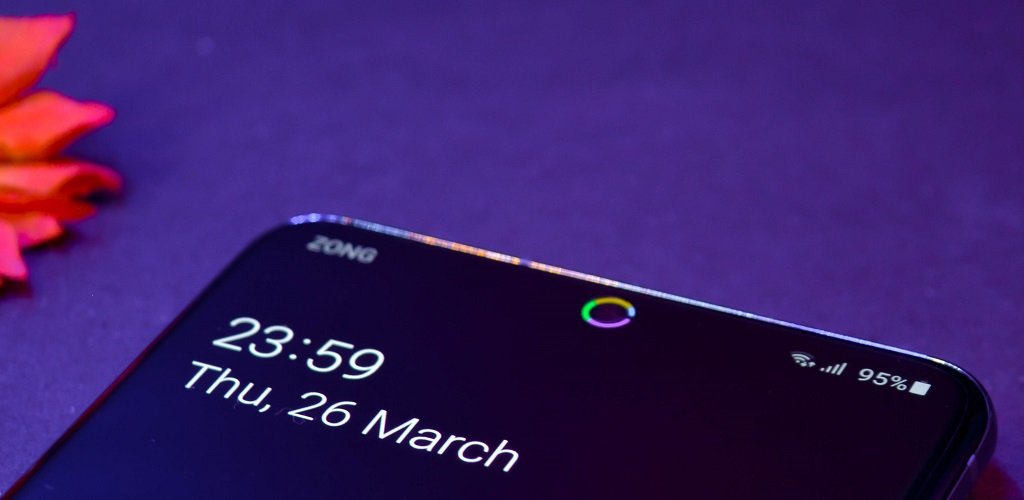
If you like customizing your Android phone, you’ve probably seen the colorful battery ring that appears around the front camera on many devices. This feature is made possible by the Energy Ring Light app, a popular Android customization tool that turns your punch-hole camera into a live battery indicator.
Instead of checking the battery percentage repeatedly, the app displays your battery level with a colored ring that changes as your battery charges or drains. It’s both practical and stylish.
In this guide, you’ll learn what the Energy Ring app does, its main features, and the best alternatives available for Android users.
What Is the Energy Ring Light App?
The Energy Ring Light app is an Android customization app that displays a circular battery indicator around your phone’s front camera.
As your battery level changes, the ring updates automatically. For example:
- A full ring indicates a fully charged battery.
- The ring gradually decreases as the battery drains.
- During charging, the animation can move or glow depending on your settings.
The app is designed mainly for phones with punch-hole cameras, although compatibility varies by device.
How Does Energy Ring Work?
The app uses Android’s accessibility and display permissions to draw a battery ring around the camera cutout.
It continuously monitors your battery percentage and updates the ring without affecting your normal phone usage.
Most versions also support charging animations and automatic updates whenever the battery level changes.
Key Features of Energy Ring
One reason the app remains popular is the number of customization options it offers.
Some of the most useful features include:
Live Battery Indicator
The ring accurately reflects your current battery percentage in real time.
Adjustable Ring Thickness
Users can increase or decrease the thickness of the ring depending on their preferred appearance.
Custom Colors
Many versions allow different colors based on battery levels.
For example:
- Green for high battery
- Yellow for medium battery
- Red for low battery
Charging Animation
When charging begins, the ring can animate to make the charging process easier to notice.
Low Battery Usage
The app is optimized to consume minimal battery and system resources when configured correctly.
Which Phones Support Energy Ring?
The app works best on Android phones with punch-hole front cameras.
Support is commonly available for many models from:
- Samsung Galaxy
- OnePlus
- Xiaomi
- OPPO
- Vivo
- Realme
- Motorola
- Google Pixel
Compatibility depends on your Android version and camera placement, so it’s always a good idea to review the supported device list before installing.
Benefits of Using Energy Ring
Many Android users install Energy Ring because it combines useful information with an attractive design.
Advantages include:
- Check battery status instantly.
- No need to open Quick Settings.
- Attractive camera ring animation.
- Highly customizable appearance.
- Lightweight performance.
- Works alongside most Android themes.
It offers a practical way to monitor battery life while enhancing your phone’s overall look.
Best Alternatives to Energy Ring
If Energy Ring isn’t compatible with your device or you’re looking for additional features, several excellent alternatives are available.
Battery Ring
Battery Ring provides a similar circular battery indicator around the front camera.
Features include:
- Adjustable thickness
- Gradient colors
- Charging animation
- Auto-hide mode
- Smooth performance
It’s one of the closest alternatives to Energy Ring.
Energy Bar
Instead of displaying a ring around the camera, Energy Bar places a thin battery indicator along the top edge of your display.
It offers:
- Battery percentage visualization
- Color customization
- Minimal battery usage
- Lightweight design
Users who prefer a cleaner interface often choose this option.
Always On Edge (AOE)
Always On Edge is much more than a battery app.
It combines:
- Edge lighting
- Notification effects
- Charging animations
- Battery indicators
- Caller notifications
If you enjoy customizing your Android phone, AOE provides one of the largest collections of visual effects.
NotifyBuddy
Many newer smartphones no longer include a physical notification LED.
NotifyBuddy recreates this feature using your display.
Highlights include:
- Notification lighting
- Battery alerts
- AMOLED support
- Custom notification colors
- Low battery consumption
It works especially well on OLED displays.
LED Me Know
LED Me Know creates animated notification effects around your screen and front camera.
Its features include:
- Battery alerts
- Charging animations
- Notification lighting
- Camera ring effects
- Custom colors
It’s ideal for users who want both notification customization and battery visualization.
How to Choose the Right Battery Ring App
Not every battery indicator app offers the same experience.
Before downloading one, consider:
Device Compatibility
Make sure the app supports your phone model and Android version.
Battery Efficiency
Choose an app that uses minimal background resources.
Customization
Look for options such as:
- Ring thickness
- Color selection
- Animation speed
- Charging effects
- Visibility controls
Ease of Use
A simple interface makes setup much faster, especially for new users.
Tips for Better Performance
To get the best experience from Energy Ring or similar apps:
- Keep the app updated.
- Allow required permissions.
- Disable battery optimization if recommended by the developer.
- Avoid running multiple battery indicator apps simultaneously.
- Restart your phone after major Android updates.
Following these steps can improve stability and reduce compatibility issues.
Frequently Asked Questions
Is Energy Ring free?
Most versions offer free features, while some advanced customization options may require an in-app purchase.
Does Energy Ring drain the battery?
The app is designed to use very little power, although battery usage may vary depending on animation settings and your device.
Can I change the ring color?
Yes. Most versions allow you to customize colors based on battery percentage or choose a single color.
Does it work on every Android phone?
No. Energy Ring is designed primarily for devices with punch-hole front cameras, and compatibility varies by manufacturer.
Can I use Energy Ring with Always On Display?
Support depends on your phone model and Android version. Some devices allow both features to work together, while others may have limitations.
Final Thoughts
The Energy Ring Light app is one of the most popular Android customization tools for users who want a stylish way to monitor battery life. Its colorful battery ring provides useful information at a glance while giving your smartphone a modern, personalized appearance.
If the app isn’t available for your device, alternatives such as Battery Ring, Energy Bar, Always On Edge, NotifyBuddy, and LED Me Know offer similar features with their own unique customization options. Choose the one that best matches your phone and personal style to make your Android experience both more attractive and more functional.
