
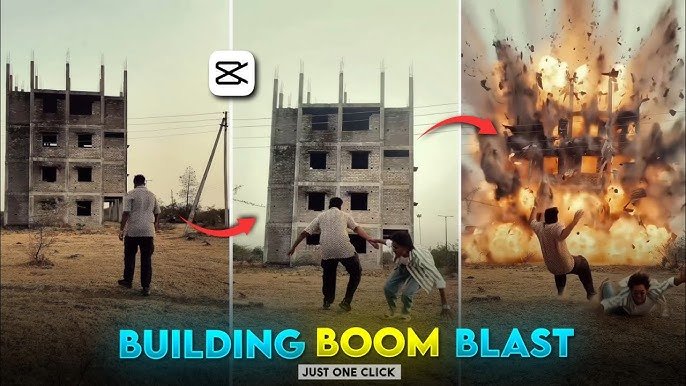
Action-packed visual effects are no longer limited to professional movie studios. Thanks to AI-powered video editing tools, creators can now generate dramatic explosion scenes, cinematic camera movements, and realistic visual effects using only a single image or a short video clip.
Whether you’re creating content for YouTube, Instagram Reels, TikTok, or digital art projects, AI video generators make it much easier to produce high-quality visual effects without advanced editing skills.
In this guide, you’ll learn how AI image-to-video technology works, how it can be used to create building explosion-style VFX, and which AI tools offer the best creative features.
Important: AI-generated explosion effects are visual simulations intended for creative projects, filmmaking, and entertainment. They should never be presented as real events or used to create misleading content.
What Is AI Image-to-Video Animation?
AI image-to-video technology transforms a still image into a short animated sequence.
Instead of manually creating every frame, artificial intelligence analyzes the image and generates realistic movement such as:
- Camera motion
- Character movement
- Lighting changes
- Smoke and particle effects
- Environmental animation
Many AI platforms can also create cinematic scenes based on text prompts, making creative video production much faster.
Creating a Building Explosion VFX Effect
A building explosion effect combines several visual elements to create a dramatic scene.
Depending on the AI tool you use, these elements may include:
- Expanding smoke clouds
- Fire effects
- Flying debris
- Dust particles
- Camera shake
- Dynamic lighting
- Slow-motion movement
The goal is to create a cinematic sequence that looks visually impressive while remaining clearly fictional.
Step 1: Prepare Your Image
Start with a high-quality image of a building or city scene.
For the best results:
- Use a high-resolution image.
- Ensure the building is clearly visible.
- Avoid blurry or heavily compressed photos.
- Leave enough empty space around the subject for visual effects.
Clear source images allow AI models to generate smoother animations.
Step 2: Import the Image into an AI Video Tool
Most AI video generators follow a simple workflow.
Typically, you’ll:
- Upload your image.
- Choose an animation style.
- Add a descriptive prompt if supported.
- Generate the animation.
- Review the result.
- Download the finished video.
Different platforms offer different levels of creative control depending on your editing needs.
Step 3: Add Cinematic Camera Motion
Static images become much more engaging when combined with virtual camera movement.
Popular cinematic effects include:
- Slow zoom
- Camera push-in
- Side pan
- Tilt movement
- Orbit camera effect
These movements add depth and make the final animation feel more like a movie scene.
Step 4: Enhance the Scene
Many AI editing platforms allow additional visual enhancements such as:
- Smoke
- Sparks
- Dust
- Dramatic lighting
- Motion blur
- Atmospheric fog
Combining multiple effects can create a more realistic cinematic appearance.
Popular AI Video Editing Features
Modern AI animation platforms offer far more than simple image movement.
Common features include:
Image-to-Video Generation
Transform still photos into animated clips with realistic motion.
AI Camera Animation
Generate professional camera movements without manual keyframe editing.
Subject Motion
Animate people, vehicles, or objects while maintaining natural movement.
Background Animation
Add moving skies, clouds, lights, weather effects, or environmental details.
Visual Style Effects
Many AI tools can create different artistic looks, including:
- Cinematic
- Realistic
- Anime
- Fantasy
- Sci-fi
- Cartoon
- Concept art
Best AI Alternatives for Image-to-Video Creation
Several AI platforms now support advanced video generation.
Popular options include:
Runway
Known for professional AI video editing, camera motion, and cinematic scene generation.
Pika
Offers image-to-video animation with creative visual styles and smooth motion effects.
Kaiber
Popular among artists for generating stylized videos, music visuals, and creative animations.
PixVerse
Provides AI-generated video effects with multiple animation templates and prompt-based scene generation.
Luma AI
Produces realistic camera movement and detailed cinematic video sequences from still images.
Each platform offers different features, so experimenting with multiple tools can help you discover the workflow that best fits your creative projects.
Tips for Better AI VFX Results
Small improvements to your source material often produce much better AI animations.
For higher-quality videos:
- Use sharp, high-resolution images.
- Keep lighting realistic.
- Write clear animation prompts.
- Avoid overcrowded scenes.
- Experiment with different camera movements.
- Generate multiple versions before selecting the final result.
AI generation is often iterative, and trying several variations usually leads to stronger results.
Advantages of AI Video Generation
AI-powered editing offers several practical benefits.
Faster Production
Animations that once required hours of manual editing can often be generated in minutes.
Beginner-Friendly
Most AI tools require little or no previous video editing experience.
Lower Costs
Many creators can produce professional-looking content without investing in expensive software or hardware.
Creative Flexibility
Users can quickly experiment with different visual styles, effects, and storytelling ideas.
Limitations to Consider
Although AI video generation has improved significantly, it’s still evolving.
You may occasionally notice:
- Minor visual artifacts
- Inconsistent object movement
- Lighting mismatches
- Unrealistic particle effects
- Less accurate results in highly detailed scenes
Generating multiple versions and refining prompts often improves the final output.
Frequently Asked Questions
Can AI create realistic explosion effects?
Many AI video generators can simulate cinematic explosion-style visual effects for fictional creative projects, although the realism varies depending on the platform.
Do I need professional editing experience?
No. Most modern AI video tools are designed for beginners as well as experienced creators.
Can I create videos from a single image?
Yes. Image-to-video AI tools can generate animated sequences using only one still image as the starting point.
Which AI platform is best?
The ideal platform depends on your project. Runway, Pika, Kaiber, PixVerse, and Luma AI each offer different creative strengths.
Are AI-generated videos suitable for social media?
Yes. Many creators use AI-generated videos for YouTube Shorts, Instagram Reels, TikTok, promotional content, and digital storytelling.
Final Thoughts
AI image-to-video technology has transformed how creators produce cinematic visual effects. Instead of relying on complex editing software, expensive hardware, or advanced animation skills, modern AI platforms can generate impressive motion, camera effects, and dramatic visual scenes in a fraction of the time.
Whether you’re experimenting with cinematic storytelling, creating concept art animations, or producing engaging social media content, AI tools provide an accessible way to turn static images into dynamic videos. As these technologies continue to evolve, creators will gain even more control over movement, visual style, and storytelling making high-quality video production more accessible than ever before.
