
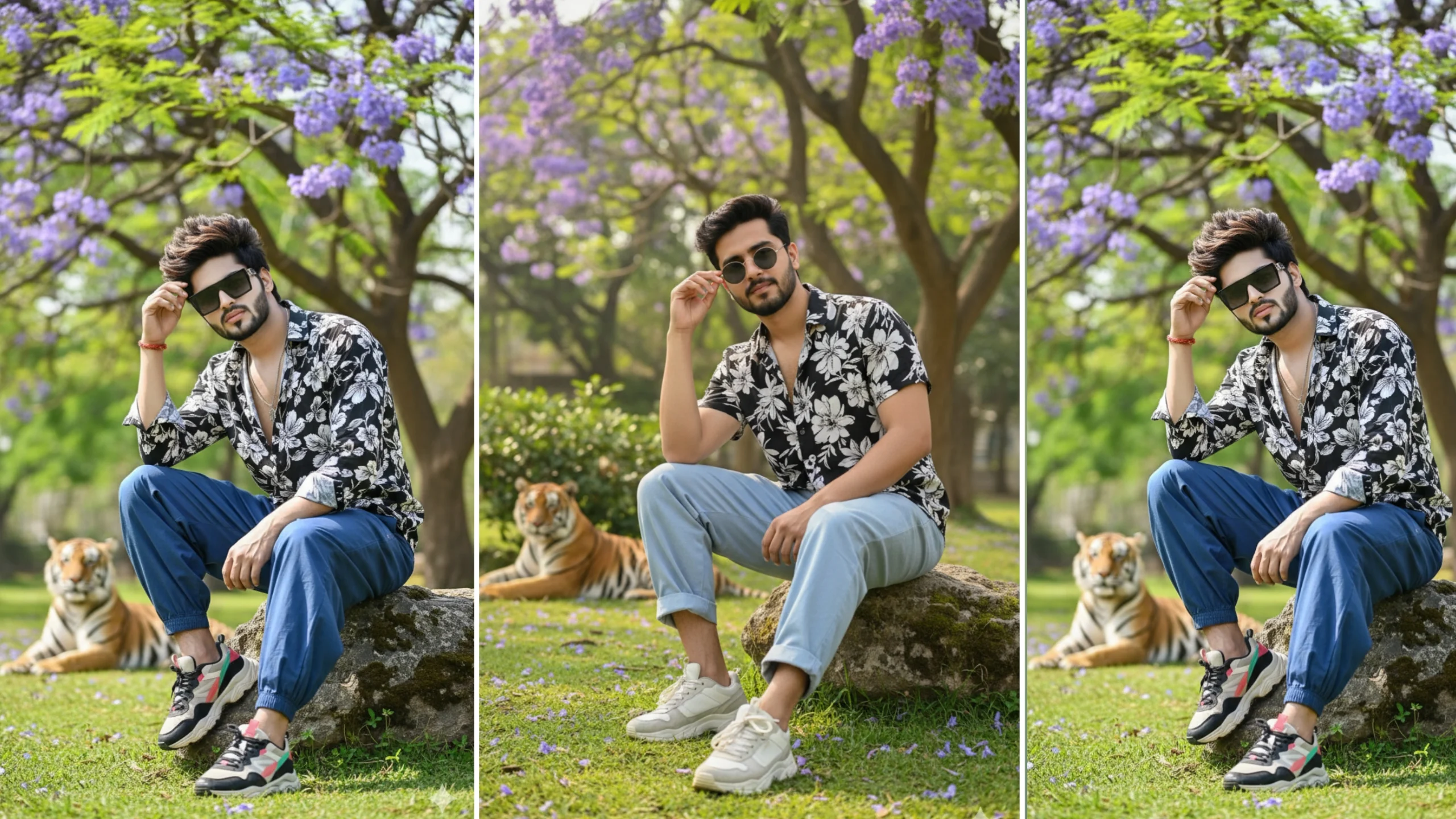
AI image generators have made it easier than ever to create professional-looking portraits with just a well-written prompt. One of the latest trends is the Google Gemini 8K Realistic Jungle Prompt, which combines lifelike photography with lush natural backgrounds for dramatic results.
Whether you’re creating a social media profile picture, experimenting with AI art, or simply exploring new styles, a detailed prompt can make a huge difference. In this guide, you’ll find a ready-to-use jungle prompt along with practical tips to improve your AI-generated images.
Note: For the best results, use a clear photo of yourself or an image you have permission to use. Avoid uploading images of others without their consent.
What Is a Google Gemini Jungle Prompt?
A jungle prompt is a detailed description that tells an AI image generator how to create a realistic outdoor portrait surrounded by forests, tropical plants, wildlife, and cinematic lighting.
Instead of giving simple instructions like “make me look cool,” a good prompt describes:
- Clothing
- Pose
- Background
- Camera angle
- Lighting
- Facial expression
- Image quality
- Photography style
The more precise your prompt, the more consistent the final image is likely to be.
Why Are Jungle Portraits Trending?
Nature-themed AI portraits have become popular because they create a premium, cinematic appearance while keeping the subject as the main focus.
Common features include:
- Dense green forests
- Mountain landscapes
- Waterfalls
- Exotic plants
- Wildlife in the distance
- Natural sunlight
- Soft background blur
These elements help produce images that resemble professional travel or fashion photography.
Google Gemini 8K Realistic Jungle Prompt
Upload your photo first, then use the following prompt.
Prompt:
Create an ultra-realistic, hyper-detailed 8K cinematic portrait using the uploaded image for the exact face, hairstyle, and facial features. Preserve the facial identity without altering expressions or proportions. The subject is wearing a stylish black-and-white floral shirt, loose blue baggy jeans, white chunky sneakers, and fashionable sunglasses. He is sitting naturally on a large stone in a lush tropical garden with one hand gently touching his hairstyle. Surround the scene with vibrant green trees, tropical plants, and a blooming jacaranda tree covered in bright purple flowers. Include soft natural daylight, realistic shadows, shallow depth of field, DSLR photography, rich textures, cinematic color grading, and high-detail skin rendering. In the distant background, place a tiger walking naturally through the jungle without drawing attention away from the main subject. Professional portrait photography, ultra-realistic lighting, 8K resolution, premium editorial style.
How to Improve AI Image Quality
Even a strong prompt can produce different results depending on the AI model. These simple adjustments often improve image quality.
Upload a Sharp Photo
Choose a photo that is:
- High resolution
- Well lit
- Facing the camera
- Free from heavy filters
- Not blurry
Clear reference images help AI preserve facial details more accurately.
Add Photography Terms
Professional photography keywords guide the AI toward realistic results.
Useful phrases include:
- DSLR photography
- Portrait lens
- 85mm lens
- Ultra-realistic
- Cinematic lighting
- Natural sunlight
- Soft shadows
- Shallow depth of field
- High dynamic range
Describe the Background Clearly
Instead of writing “beautiful jungle,” describe the scene in more detail.
For example:
- Dense rainforest
- Tropical plants
- Mountain waterfall
- Green moss-covered rocks
- Morning sunlight
- Misty forest atmosphere
Specific descriptions usually produce more believable environments.
Popular Jungle Themes to Try
If you want to experiment with different styles, consider changing the environment while keeping the same portrait.
Some popular ideas include:
Waterfall Portrait
Place the subject beside a crystal-clear waterfall with natural mist and lush greenery.
Wildlife Adventure
Create a cinematic scene featuring elephants, deer, or birds in the distance while keeping the focus on the person.
Rainforest Explorer
Generate an adventurous portrait surrounded by giant trees, vines, and tropical vegetation.
Golden Hour Jungle
Use warm sunset lighting filtering through tall trees to create a dramatic cinematic effect.
Tips for Better AI Prompts
Small prompt improvements often create noticeably better images.
Keep these suggestions in mind:
- Mention realistic skin texture.
- Specify the clothing style.
- Describe the camera angle.
- Include lighting conditions.
- Keep facial identity unchanged.
- Avoid conflicting instructions.
A clear and organized prompt helps the AI understand exactly what you’re trying to create.
Responsible Use of AI Images
AI tools make image creation easier, but it’s important to use them responsibly.
Before generating images:
- Use your own photos whenever possible.
- Respect copyright and privacy.
- Don’t create misleading images intended to impersonate others.
- Follow the platform’s community guidelines.
Responsible use helps maintain trust while allowing creators to explore AI-powered creativity.
Frequently Asked Questions
Does Google Gemini support realistic image prompts?
Google Gemini can assist with creating detailed prompts, and image generation capabilities may vary depending on the version and features available to you.
Why do some AI images look unrealistic?
This usually happens when prompts are too short or contain conflicting instructions. Adding clear details about lighting, camera style, clothing, and background often improves the results.
What resolution should I request?
Many creators include terms such as “8K” or “high resolution” to encourage more detailed outputs, though the final resolution depends on the AI tool being used.
Can I customize the background?
Yes. You can replace the jungle with mountains, beaches, cities, castles, deserts, or any environment you prefer by editing the prompt.
Final Thoughts
The Google Gemini 8K Realistic Jungle Prompt is a great starting point for creating cinematic AI portraits with natural scenery and professional photography effects. A well-written prompt, combined with a clear reference image, can produce impressive results that stand out on social media or in your personal collection.
Experiment with different landscapes, lighting conditions, and camera styles to discover your preferred look. Refining your prompt over time is one of the easiest ways to achieve more realistic and visually striking AI-generated images.
