
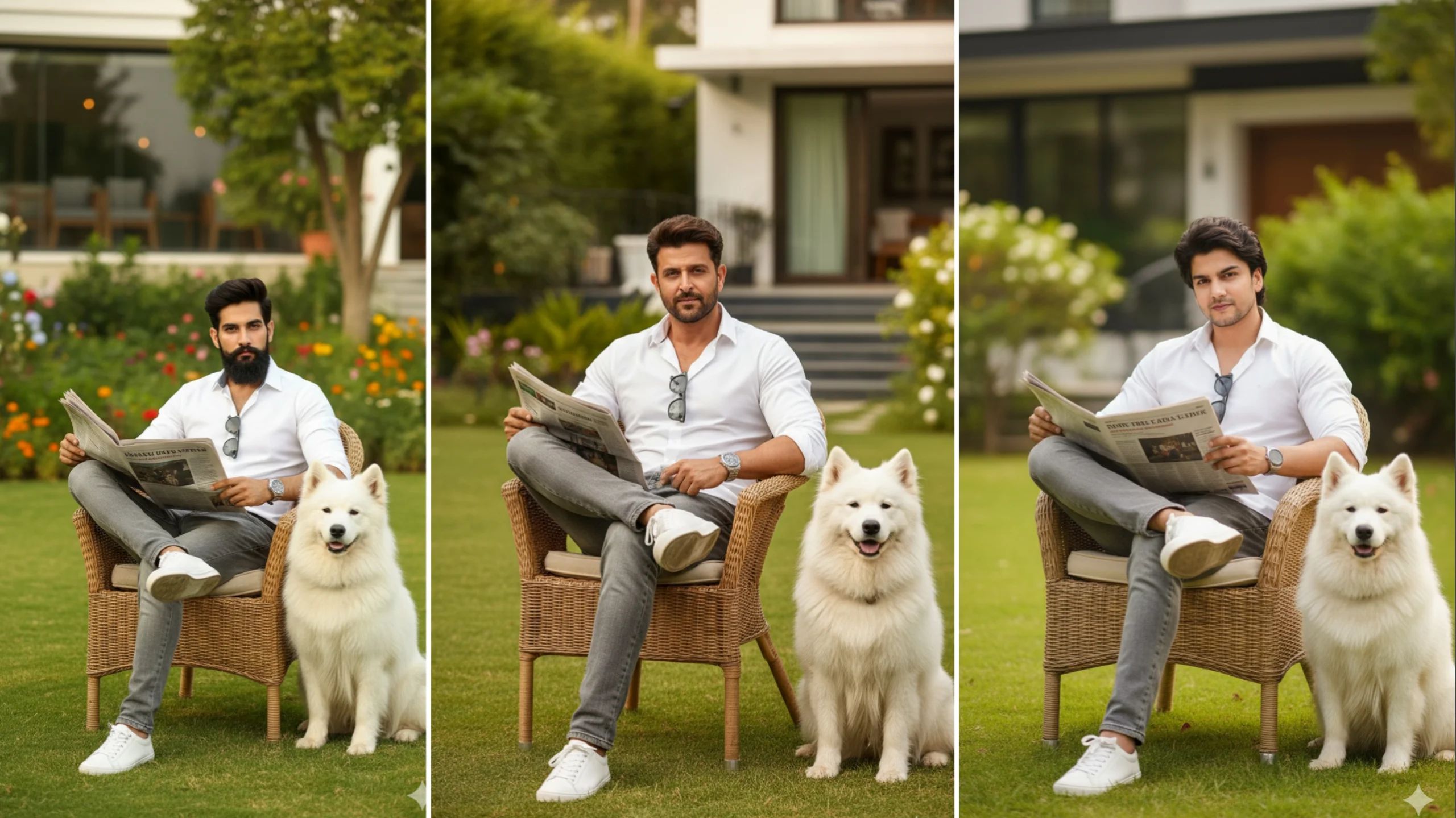
AI-generated portraits have become one of the biggest social media trends. One popular style features a person posing with a majestic white dog in a luxury outdoor setting, creating a cinematic and magazine-quality image.
Many users are recreating this trend using Google Gemini because it allows detailed image generation through natural language prompts. By describing the scene clearly, you can create realistic AI portraits that match your preferred style.
In this guide, you’ll learn how the Google Gemini White Dog Trending Prompt works, how to write better prompts, and tips for getting high-quality AI-generated images.
What Is the Google Gemini White Dog Trend?
The White Dog trend is an AI portrait style where a person is placed in a luxurious outdoor environment alongside a large white dog, often a Samoyed. The result resembles a professional fashion photoshoot with cinematic lighting and realistic details.
Common elements include:
- Luxury garden or villa background
- Stylish clothing
- Magazine-style posing
- Warm natural lighting
- Ultra-realistic quality
- White Samoyed companion
- Soft depth of field
The trend has become popular across Instagram, Facebook, TikTok, and other social media platforms.
What Is Google Gemini?
Google Gemini is Google’s AI assistant that can understand both text and images. Besides answering questions and helping with writing, Gemini can also generate and edit images using natural language prompts.
Instead of manually editing photos, you simply describe the scene you want, and the AI creates or transforms the image accordingly.
For example, you can ask Gemini to:
- Change backgrounds
- Improve lighting
- Add objects
- Create cinematic portraits
- Enhance colors
- Apply artistic styles
This makes image creation much easier for beginners.
How to Use the White Dog Prompt in Google Gemini
Creating this trending image is straightforward.
Step 1: Upload Your Photo
Upload a clear, high-resolution image of yourself.
For the best results:
- Face the camera.
- Use good lighting.
- Avoid blurry images.
- Keep your face unobstructed.
A quality source photo helps Gemini generate more accurate results.
Step 2: Enter a Detailed Prompt
Describe every important detail, including:
- Clothing
- Pose
- Background
- Lighting
- Camera style
- Dog breed
- Image quality
The more specific your prompt is, the better the generated image usually becomes.
Step 3: Generate the Image
Gemini analyzes your uploaded image together with the prompt and creates a new AI-generated portrait.
If the first result isn’t exactly what you expected, adjust your prompt by adding or removing details and generate another version.
Example White Dog Trending Prompt
Here’s an example prompt inspired by the popular trend:
Create an ultra-realistic cinematic portrait using my uploaded photo. Keep my facial features and hairstyle natural. Dress me in a clean white button-up shirt, grey jeans, and white sneakers with a silver wristwatch. Seat me on a stylish wicker chair in a luxury garden outside a modern home during warm golden-hour lighting. Place a fluffy white Samoyed dog beside the chair. Use soft background blur, natural colors, editorial fashion photography style, shallow depth of field, and high-detail 8K quality.
You can customize the clothing, background, pose, or accessories to match your personal style.
Tips for Writing Better Gemini Prompts
A well-written prompt can significantly improve the final image.
Be Specific
Instead of writing:
- “Make me look good.”
Try:
- “Create a realistic portrait with warm evening sunlight and luxury garden scenery.”
Describe the Environment
Mention details like:
- Garden
- Beach
- Mountain
- Luxury villa
- City skyline
- Forest
- Café
The AI uses these descriptions to build the background.
Mention Lighting
Lighting has a major impact on image quality.
Popular styles include:
- Golden hour
- Morning sunlight
- Soft daylight
- Studio lighting
- Sunset glow
- Cinematic lighting
Include Camera Effects
Professional photography terms often improve results.
Examples include:
- Shallow depth of field
- Bokeh background
- Editorial photography
- High dynamic range
- Ultra-realistic
- DSLR quality
Keep Prompts Organized
A structured prompt is easier for AI to understand.
Include details in this order:
- Subject
- Clothing
- Pose
- Background
- Lighting
- Camera style
- Image quality
Why This Trend Is So Popular
Several factors have contributed to its popularity.
Luxury Appearance
The elegant settings and stylish outfits create premium-looking portraits.
Social Media Friendly
These images work well as:
- Instagram profile pictures
- Facebook posts
- Display photos
- Portfolio images
No Photography Skills Needed
Anyone can create professional-looking portraits without expensive cameras or editing software.
Creative Freedom
Users can easily experiment with different:
- Outfits
- Backgrounds
- Seasons
- Animals
- Color styles
Every prompt produces something unique.
Common Mistakes to Avoid
Many beginners don’t get the results they expect because of vague prompts.
Avoid these common mistakes:
- Using blurry source photos
- Writing very short prompts
- Giving conflicting instructions
- Requesting too many effects at once
- Ignoring lighting details
Clear instructions usually produce better images.
Ethical Use of AI Images
AI image generation is powerful, but it should be used responsibly.
Keep these points in mind:
- Avoid misleading people with fake images.
- Don’t create images using someone else’s photo without permission.
- Respect copyright and privacy.
- Clearly identify AI-generated content when appropriate.
Responsible use helps maintain trust while enjoying AI creativity.
Future of AI Image Generation
AI-powered image creation continues to improve rapidly.
Future updates may include:
- Faster image generation
- Better facial consistency
- Improved realism
- Live image editing
- Video generation
- More personalized artistic styles
As AI evolves, creating professional-quality visuals will become even easier.
Final Thoughts
The Google Gemini White Dog Trending Prompt is a creative way to generate stylish, realistic AI portraits without advanced editing skills. By combining a clear source photo with a detailed prompt, you can create high-quality images featuring luxury backgrounds, cinematic lighting, and elegant compositions.
The key to great results is writing detailed prompts that describe the subject, environment, lighting, clothing, and overall style. With a little experimentation, you can produce unique AI portraits that stand out on social media while exploring the creative possibilities of Google’s Gemini.
Frequently Asked Questions
What is the Google Gemini White Dog trend?
It is a popular AI image style featuring a person in a luxury setting with a white Samoyed dog, created using detailed prompts in Google Gemini.
Can Google Gemini edit existing photos?
Yes. Gemini can enhance uploaded images by changing backgrounds, adjusting lighting, adding objects, and applying artistic styles, depending on the features available.
What type of photo works best?
Use a clear, high-resolution image with good lighting and a visible face for the most accurate results.
How can I improve my AI-generated images?
Write detailed prompts that describe clothing, pose, lighting, background, camera style, and image quality instead of using short or vague instructions.
Is it safe to use AI-generated portraits on social media?
Yes, as long as you use your own photos or have permission to use the original images and follow the platform’s content guidelines.
