
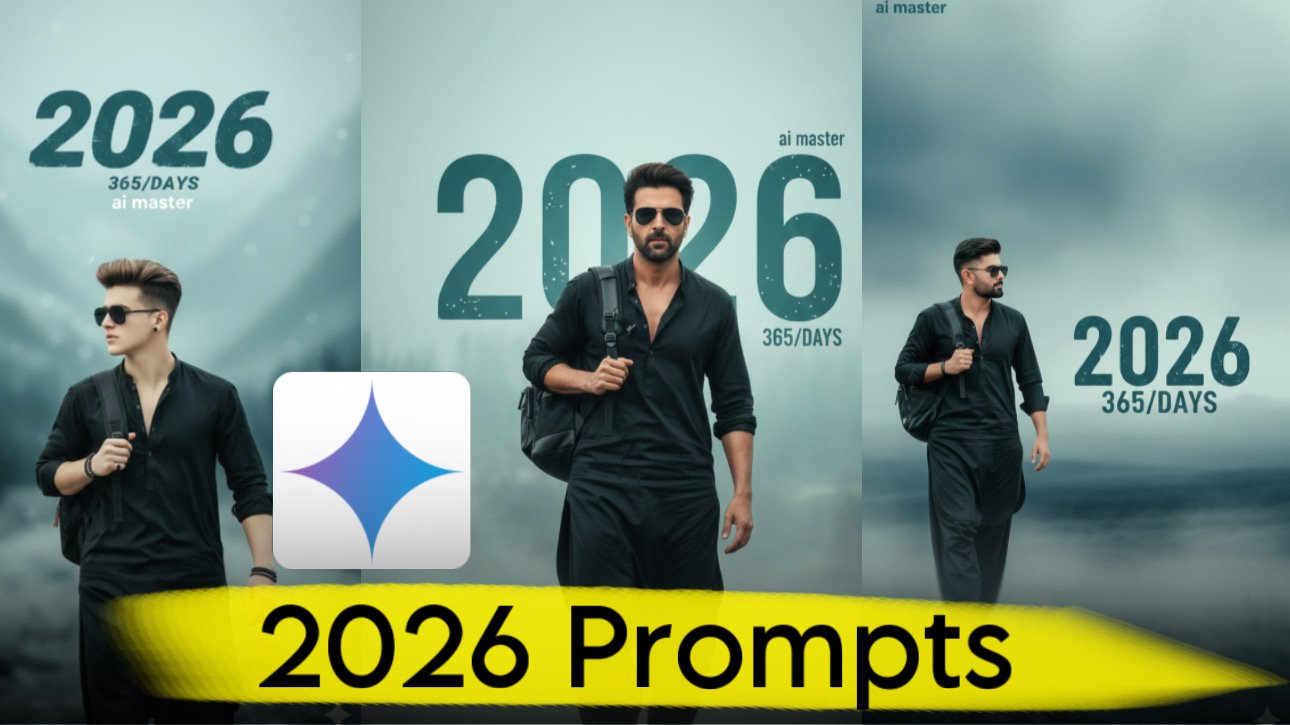
New Year-themed AI portraits are one of the biggest image trends on social media. Whether you’re updating your profile picture, creating a festive post, or designing personalized greetings, a well-written prompt can help you generate realistic, eye-catching results.
In this guide, you’ll find a detailed Happy New Year 2026 AI prompt for Google Gemini, along with practical tips to improve image quality and create cinematic portraits that stand out.
Note: For the best results, upload a clear photo of yourself or use an image you have permission to edit. Avoid using someone else’s photo without their consent.
Why New Year AI Portraits Are Trending
Every New Year, millions of people share customized AI-generated images featuring festive backgrounds, glowing lights, fireworks, and bold typography displaying the upcoming year.
These portraits are popular because they combine professional photography effects with personalized styling, making them ideal for:
- WhatsApp profile pictures
- Instagram posts
- Facebook cover photos
- Pinterest pins
- Greeting cards
- Social media stories
Adding New Year-themed elements gives an ordinary portrait a festive and premium look.
Happy New Year 2026 Google Gemini Prompt
Upload your photo first, then use the following prompt.
Prompt:
Create an ultra-realistic 8K cinematic portrait using the uploaded image for the exact face, hairstyle, beard, and facial features. Preserve the facial identity completely without altering expressions or proportions. The person is wearing black sunglasses, a premium black Shalwar Kameez with the upper buttons slightly open, and carrying a black backpack over the left shoulder. Show the subject walking confidently through a softly blurred foreground with a relaxed and natural posture. The camera angle is from the left side, creating a cinematic perspective. The background features a dreamy mist-filled landscape with soft teal, blue, and light gray tones. Add bold distressed typography displaying “2026” in large teal lettering, with smaller text reading “365 Days” underneath. Include a subtle “Happy New Year” message at the top in elegant modern typography. Soft natural lighting, shallow depth of field, realistic shadows, premium color grading, DSLR photography, ultra-detailed textures, cinematic atmosphere, and professional editorial style. High-resolution 8K image with a clean, modern festive appearance.
Customize Your New Year Portrait
You can easily personalize the prompt by changing the background or clothing style.
Popular ideas include:
City Fireworks
Generate a night skyline filled with colorful fireworks celebrating the New Year.
Luxury Street Scene
Create a modern city street with decorative lights, premium cars, and festive decorations.
Winter Celebration
Use snowy landscapes, glowing lights, and elegant holiday decorations for a seasonal look.
Golden Hour Theme
Choose warm sunset lighting for a softer and more natural portrait.
Tips for Better AI Image Results
A few small improvements can make your portrait look much more realistic.
Upload a High-Quality Photo
For the best outcome, choose a photo that is:
- Bright and well lit
- High resolution
- Facing the camera
- Free from heavy filters
- Clear enough to show facial details
Add Photography Details
Professional photography keywords help improve realism.
Useful terms include:
- DSLR photography
- 85mm portrait lens
- Cinematic lighting
- Soft natural shadows
- Ultra realistic
- High dynamic range
- Shallow depth of field
- Editorial photography
Keep the Prompt Organized
Separate your prompt into clear sections such as:
- Subject
- Clothing
- Pose
- Background
- Lighting
- Camera angle
- Image quality
A structured prompt is easier for AI models to interpret.
Best Color Themes for 2026 Portraits
Color grading has a big impact on the final image.
Popular combinations include:
- Teal and gold
- Black and silver
- Blue and white
- Emerald green and black
- Midnight blue with golden highlights
These palettes create a modern and festive appearance without overwhelming the portrait.
AI Prompt Writing Tips
When creating AI image prompts, remember these best practices:
- Describe the environment clearly.
- Mention realistic lighting.
- Specify camera perspective.
- Include clothing details.
- Request high image quality.
- Ask the AI to preserve facial identity.
Clear instructions usually produce more consistent results than very short prompts.
Use AI Images Responsibly
AI-generated images should always be created responsibly.
Keep these guidelines in mind:
- Use your own photos whenever possible.
- Respect privacy and copyright.
- Avoid creating misleading or deceptive content.
- Follow the terms of the AI platform you are using.
Responsible use helps ensure a positive experience for everyone.
Frequently Asked Questions
Can I use this prompt in Google Gemini?
Yes. The prompt is designed to work as a detailed image-generation prompt. Actual image generation features depend on the Gemini version and capabilities available to you.
Can I change the outfit?
Absolutely. You can replace the clothing description with casual, formal, traditional, or festive outfits that suit your style.
Can I change the background?
Yes. You can swap the misty landscape for fireworks, city lights, beaches, mountains, gardens, or any other scene.
Will the AI keep my face unchanged?
Including instructions to preserve your facial identity helps guide the AI, though results can vary depending on the model and the quality of your uploaded image.
Final Thoughts
A well-crafted Happy New Year 2026 prompt can transform an ordinary photo into a cinematic AI portrait suitable for social media, greeting cards, or personal keepsakes. By combining clear subject details, festive backgrounds, realistic lighting, and professional photography styles, you can generate images that feel polished and unique.
Experiment with different color themes, environments, and camera angles to create a New Year portrait that matches your personality while keeping the overall design clean, realistic, and visually appealing.
