
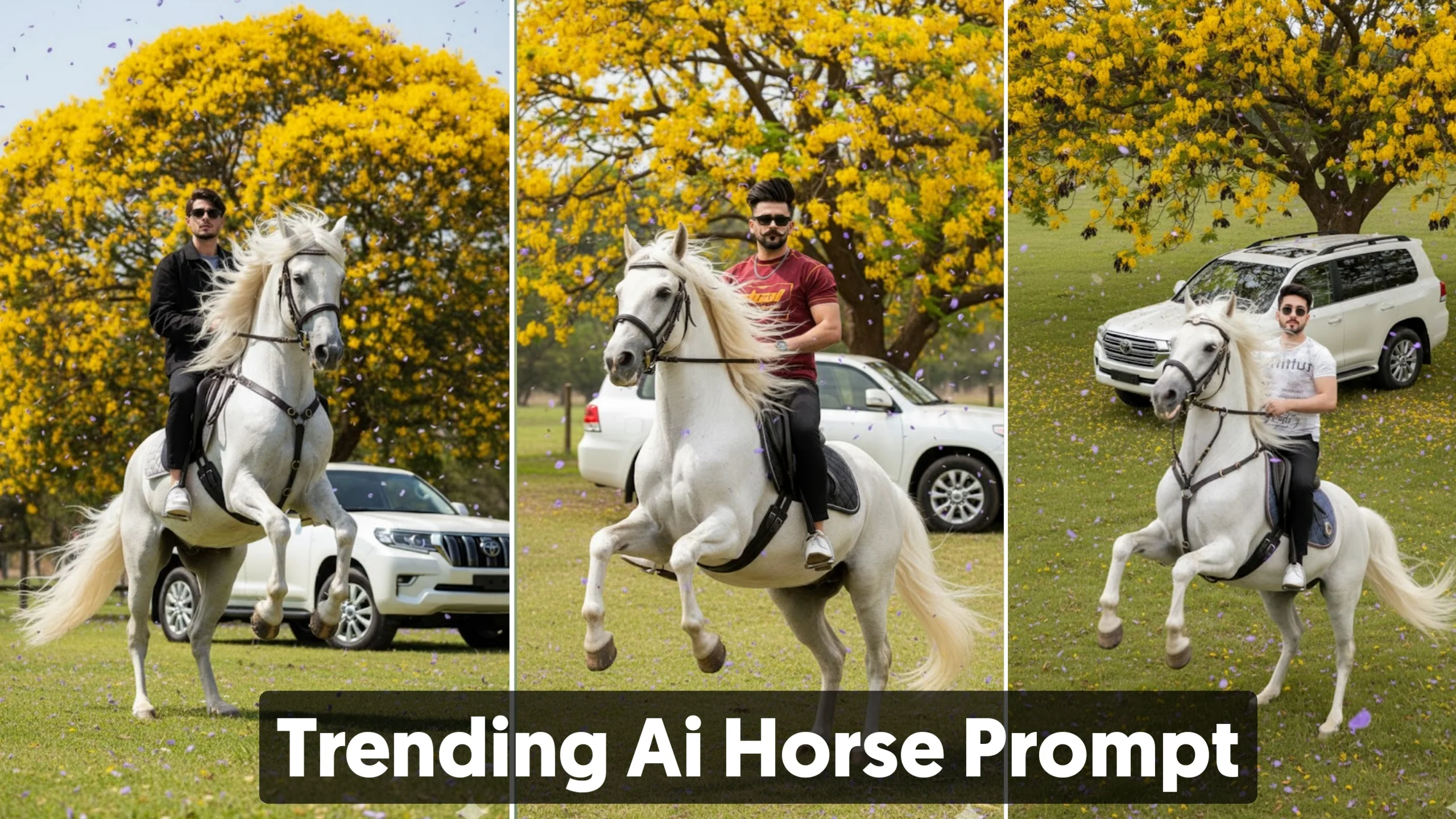
AI image generation has made it possible to create professional-looking artwork, portraits, and cinematic scenes with just a well-written prompt. One trend that has recently gained popularity is the Google Gemini Yellow Background Horse Prompt, where a person is shown riding or posing with a majestic white horse against a vibrant yellow floral background.
The quality of these AI images depends heavily on the prompt you use. A clear, detailed prompt gives the AI enough information to produce realistic lighting, accurate compositions, and visually appealing results.
In this guide, you’ll learn how to write better prompts for Google Gemini, discover useful prompt-building tools, and explore some of the best AI image generators available today.
What Is the Google Gemini Yellow Background Horse Prompt?
The Google Gemini Yellow Background Horse Prompt is a detailed AI image prompt designed to generate cinematic portraits featuring:
- A realistic white horse
- A bright yellow flower background
- Luxury vehicles or outdoor scenery
- High-quality photography effects
- A realistic portrait of the subject
This prompt style has become popular on social media because it creates eye-catching images with strong colors and dramatic compositions.
Why Detailed Prompts Produce Better Images
Modern AI image generators don’t simply recognize keywords. They analyze the complete description to understand:
- The subject
- The background
- Camera angle
- Lighting
- Clothing
- Mood
- Artistic style
- Image quality
For example, writing:
A man riding a horse
will usually create a basic result.
A more detailed prompt such as:
A cinematic 4K portrait of a man riding a majestic white horse in a green field surrounded by blooming yellow flowers during golden hour with soft natural lighting and realistic textures
provides much more context and usually produces a higher-quality image.
Example Google Gemini Horse Prompt
Here’s an example of a well-structured prompt:
A cinematic 4K portrait of a confident young man sitting on a majestic white horse with a long flowing mane in an open grassy field. Behind him is a vibrant tree filled with yellow flowers while soft petals gently fall through the air. Warm golden sunlight creates realistic highlights and natural shadows. A luxury white SUV is parked in the background. Ultra-realistic photography, DSLR quality, sharp focus, detailed textures, cinematic color grading, shallow depth of field.
This type of prompt gives the AI clear instructions while leaving room for creative interpretation.
Tips for Writing Better AI Image Prompts
Whether you’re using Google Gemini or another AI image generator, these techniques can improve your results.
Describe the Main Subject
Include details such as:
- Age
- Gender
- Hairstyle
- Clothing
- Pose
- Facial expression
The more specific your description, the more accurate the final image is likely to be.
Explain the Background
The environment has a huge impact on the overall appearance.
Examples include:
- Yellow flower garden
- Mountain landscape
- Luxury mansion
- Modern city
- Forest
- Desert
- Beach
Adding environmental details makes scenes feel more realistic.
Include Lighting Information
Lighting creates mood and realism.
Popular options include:
- Golden hour
- Soft morning light
- Sunset lighting
- Cinematic lighting
- Studio lighting
- Dramatic shadows
These details often improve the overall quality of AI-generated images.
Specify the Camera Style
Photography terms help AI create more professional-looking results.
Useful phrases include:
- DSLR photography
- Close-up portrait
- Wide-angle lens
- Eye-level view
- Low-angle shot
- Shallow depth of field
- Bokeh background
- 85mm portrait lens
These additions can significantly improve realism.
Prompt Builder Apps Like PixPrompt
Writing detailed prompts isn’t always easy, especially for beginners.
Prompt-building apps help organize ideas into descriptions that AI image generators understand more effectively.
Some common features include:
- Keyword suggestions
- Style recommendations
- Lighting presets
- Camera angle options
- Ready-made templates
- Easy prompt editing
These tools can save time while helping users create better prompts.
Best Alternatives for AI Image Generation
If you’re looking beyond prompt-building apps, several AI platforms can generate high-quality artwork directly.
Google Gemini
Google Gemini can generate detailed image prompts and, depending on available features, assist with AI image creation and editing.
Best for:
- Detailed scene descriptions
- Creative brainstorming
- Image prompt refinement
ChatGPT
ChatGPT is excellent for expanding simple ideas into professional image prompts that work well with AI image-generation models.
Best for:
- Prompt engineering
- Prompt refinement
- Creative ideas
DALL·E
DALL·E can create realistic and artistic images from text descriptions.
It performs especially well with:
- Realistic portraits
- Illustrations
- Creative concepts
- Product mockups
Stable Diffusion
Stable Diffusion is an open-source AI image model that offers extensive customization for experienced users.
It is popular among:
- Digital artists
- Designers
- Developers
- AI enthusiasts
Leonardo AI
Leonardo AI provides advanced image-generation tools with strong customization options.
It’s particularly useful for:
- Concept art
- Character design
- Gaming assets
- Fantasy illustrations
Canva AI
Canva includes AI image-generation features within its design platform.
It’s ideal for:
- Social media graphics
- Presentations
- Marketing materials
- Quick visual content
Common Prompt Mistakes to Avoid
Many beginners make similar mistakes when writing prompts.
Avoid:
- Using overly short descriptions
- Adding conflicting instructions
- Ignoring lighting details
- Forgetting the background
- Including unnecessary repetition
Simple, organized prompts usually produce better results than confusing or overly complicated ones.
Best Practices for Better AI Images
To consistently improve your AI artwork:
- Be specific.
- Describe the environment.
- Mention lighting.
- Add photography terms.
- Choose an artistic style.
- Experiment with different wording.
- Revise prompts after each generation.
Even small changes can noticeably improve the final image.
Final Thoughts
The Google Gemini Yellow Background Horse Prompt has become a popular style because it combines realistic photography, vibrant colors, and cinematic composition into a striking visual. While the final image depends on the AI model you use, the quality of your prompt remains the most important factor.
By learning how to structure prompts, adding detailed descriptions, and experimenting with different creative styles, you can generate more professional-looking AI artwork. Whether you’re creating portraits for social media, digital art, or personal projects, a well-crafted prompt will always produce better results than a simple one-line description.
Frequently Asked Questions
What is the Google Gemini Yellow Background Horse Prompt?
It is a detailed AI image prompt designed to generate realistic portraits featuring a white horse, vibrant yellow floral backgrounds, and cinematic photography effects.
Can Google Gemini generate AI images?
Image-generation capabilities may vary depending on the version and features available. Google Gemini can also assist with creating detailed image prompts.
Which AI tool creates the best prompts?
ChatGPT is widely used for prompt writing and refinement, while Google Gemini also performs well for complex scene descriptions.
Do longer prompts always work better?
Not always. A clear, well-structured prompt with relevant details is generally more effective than an unnecessarily long prompt.
Can beginners create professional AI images?
Yes. With practice and well-written prompts, even beginners can generate impressive AI artwork using modern image-generation tools.
